
Many people save special moments in photos, then feel sad when the images look dull. Time, poor light, or shaky hands can steal sharpness and color from memories. Multiple users search online for free photo enhancers to fix pictures without learning skills. Simple tools now help restore brightness and warmth, making old photos enjoyable again. Thus, this guide explains easy options, clear steps, and real uses to improve photos.
Part 1. What are Photo Enhancers – How They Work?
Photo enhancers are digital tools that can improve image quality through adjustments. Additionally, they automatically fix common issues like blur, fading noise, and dull color. Older methods need manual sliders, so results depend on user skill and time. Most modern photo repair software uses AI to better reconstruct image details.
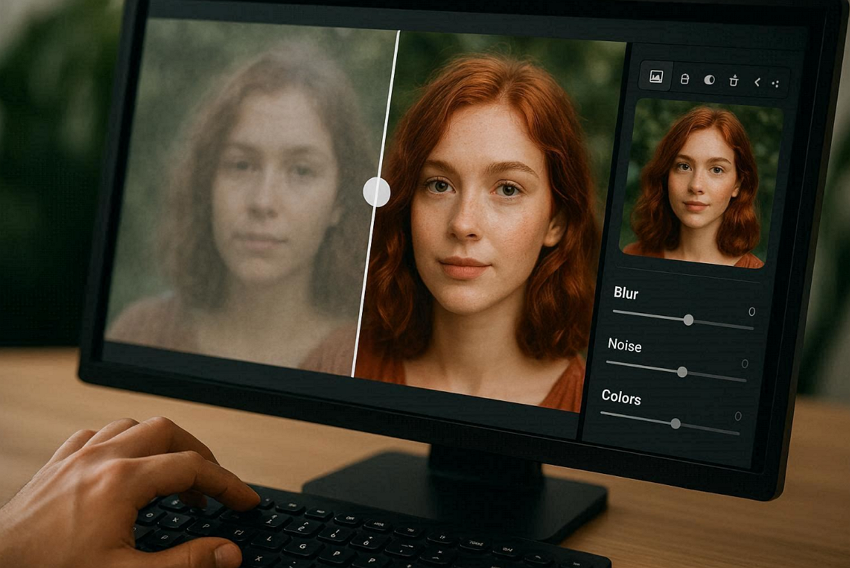
As a result, users can restore blurry or faded photos with ease today. They even upscale low-res shots to HD levels without odd looks. Hence, images look natural and ready for sharing or printing for online use. This process helps faces, textures, and backgrounds look clearer, balanced, and natural. These tools help beginners fix old, low-quality, or damaged images.
Why Photos Lose Quality: Common Causes of Blurriness and Fading
Pictures lose clarity over time due to flaws, poor storage, and handling problems. The following causes help users decide where a free photo enhancer is required:
- Motion Blur: A slow shutter speed causes motion smearing when the camera or subjects move during capture. Handshaking or walking subjects increases blur because sensors record motion.
- Focus Errors: Wrong focus points make faces soft because cameras lock onto background objects nearby. Autofocus fails in low-contrast scenes, leaving details often unclear and faded.
- Low Light: Dark places force higher ISO settings, creating grain noise that reduces sharpness overall. Sensors struggle without light, so images appear dull, blotchy, and unclear.
- Heavy Editing: Too many filters increase noise and damage the original photo hard. Strong sharpening exaggerates edges, while smoothing removes texture and natural detail information inside.
- Compression Loss: Saving photos as JPEG multiple times often reduces data and makes images appear soft. Each time you save, pixels get lost, so details fade, and color look uneven.
Part 2. Try Repairit Desktop: The Perfect On-the-Go Solution for Photo Repair/Enhancement
Some users need the best app for AI photos to restore damaged or broken photos. Repairit is an ideal option for this, as it restores faded color and lost visual depth to old photos. This advanced tool uses precise AI models to target damage without harming good areas. Plus, it handles severely damaged photos that basic tools usually cannot restore.
It also uses intelligent analysis to match the repair method with the photo damage type. Moreover, Repairit enhances photo resolution up to 8x while keeping details sharp and natural. For users without photo-editing experience, it completes photo repair without manual adjustments or settings. Furthermore, you can upscale images intelligently without stretching or distorting original details. Additionally, the tool repairs multiple damaged photos together, saving time and manual effort.
Key Features
- Fast Processing: Repairs photos fast using optimized AI-powered processing technology.
- Keeps Details Safe: Preserves original photo textures while repairing damaged areas.
- Visual Recovery: Rebuilds missing visual data to produce clearer, more complete images.
Detailed Guide to Repair Your Damaged or Corrupted Photos Using Repairit
Let’s explore the steps below to restore damaged photos via this advanced AI tool:
Step 1. Import Damaged or Corrupted Photos
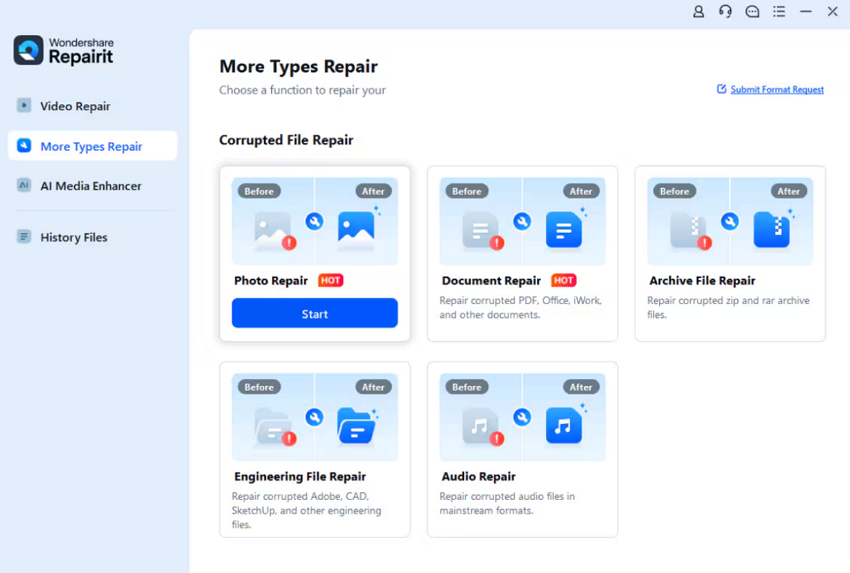
Launch the tool on your PC and go to the “More Types Repair” section to select the “Photo Repair” option.
Step 2. Repair Your Added Photos
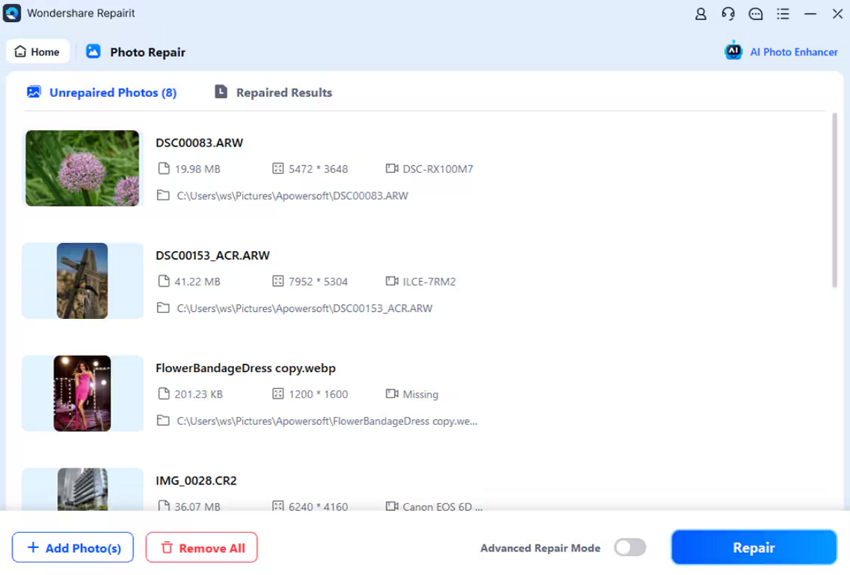
When you add your damaged photos, click the “Repair” button to start the repair process.
Step 3. Preview or Save Photos
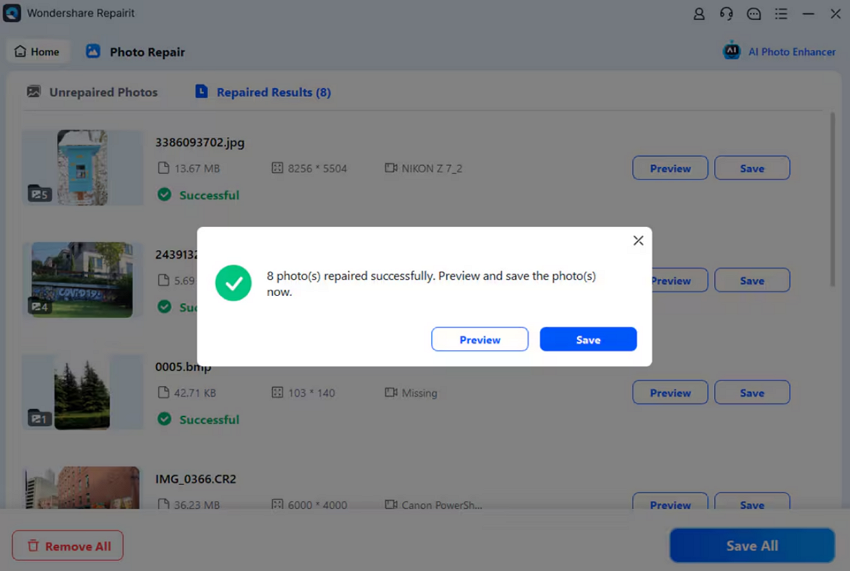
Once your damaged photos get repaired, press the “Save All” button to download them to your device.
Part 3. Online Solution: Enhancing Photos with Repairit Online
When users repair their damaged or corrupted photos, they want free photo enhancers. To address this need, Repairit Online is an ideal option, enhancing blurry photos to make objects clearer. It uses AI algorithms tuned to enhance facial clarity and detail with exactness. The tool removes grainy artifacts from high ISO or compressed images cleanly. This automatically adjusts tones and temperature to achieve visually pleasing, realistic results fast.
You can even fix bright areas, recover detail while maintain realistic lighting balance. After repairing, users can even preview their photos before the final download. You can restore sharpness to photos affected by moving subjects or camera shake. It enhances cartoon or anime images to up to 4K resolution, preserving color and detail.
Key Features
- Denoise Tool: Reduces digital noise from high ISO settings or low-light conditions.
- Contrast Boost: Enhances contrast to define objects and bring out subtle image textures.
- Artifact Removal: Removes unwanted compression artifacts or pixelation from JPEG or online images.
Guide to Enhance Blurred or Shaky Photos via Repairit Online
Go through the steps below to improve your photo quality with ease:
Step 1. Upload Your Photos
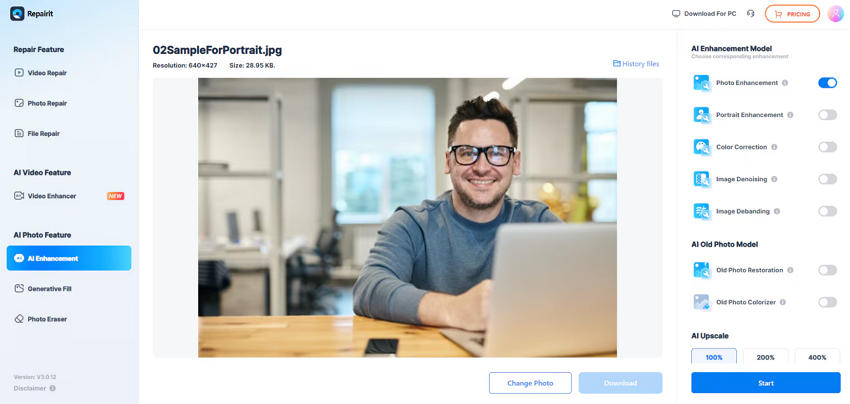
Go to the “AI Enhancement” section and click the “Add Photo” button to add photos.

Step 2. Enhance Your Added Photos
Once you add the photos, enable your desired “AI Enhancement Model” toggles and click the “Start” button to start enhancement.
Step 3. Preview and Export the Enhanced Photos
When the process completes, you can preview them and click the “Download” button to save them.

Part 4. Real-World Use Cases: Repairit in Action
Repairit works in everyday scenarios where photos lose quality or get corrupted. Users rely on the best AI photo app to restore images while preserving natural color. Below are common cases where the tool fixes and preserves photo quality:
- Family Memories: Old prints often fade because of sunlight exposure and paper aging. Dust and handling create scratches that reduce image clarity and details.
- Wedding Photos: Event photos blur due to low light and sudden movement. Also, camera memory errors sometimes corrupt digital files, making photos unreadable or lost.
- Corrupted Files: Photos get damaged during transfer from phones because of power failures. Plus, missing file segments or header issues prevent files from opening or displaying.
- Faded Visuals: Old or scanned photos lose contrast due to chemical fading over time. Many times, sunlight and storage in poor conditions reduce color accuracy and overall impact.
- Noisy Photos: Low light adds noise due to high ISO and weak sensors. Moreover, shadows and blur hide details, making images look dull and unclear for sharing.
Conclusion
To summarize, photos lose clarity and vibrancy due to time and poor lighting. Consequently, many struggle to restore memories or improve everyday snapshots. Yet, free photo enhancers now make it simple for anyone to fix blurry or noisy images. Therefore, a reliable, easy, and high-quality restoration solution is necessary. Repairit is the ideal tool, offering both offline and online use of AI to repair and enhance photos.

Lynn Martelli is an editor at Readability. She received her MFA in Creative Writing from Antioch University and has worked as an editor for over 10 years. Lynn has edited a wide variety of books, including fiction, non-fiction, memoirs, and more. In her free time, Lynn enjoys reading, writing, and spending time with her family and friends.