Video has become one of the easiest ways to explain an idea. A short clip can show how a product works, introduce a service, teach a simple process or turn a written concept into something people can understand quickly.
The problem is that video is still harder to make than most other types of content.
A blog post can be edited in minutes. A graphic can be adjusted quickly. A video often needs planning, images, motion, timing, audio, review and multiple versions. For many creators and small teams, that makes video feel useful but slow.
AI video tools are beginning to change that. They can help people create early drafts from text, images, audio and reference clips. These drafts may not replace professional production, but they can make video easier to test, discuss and improve.
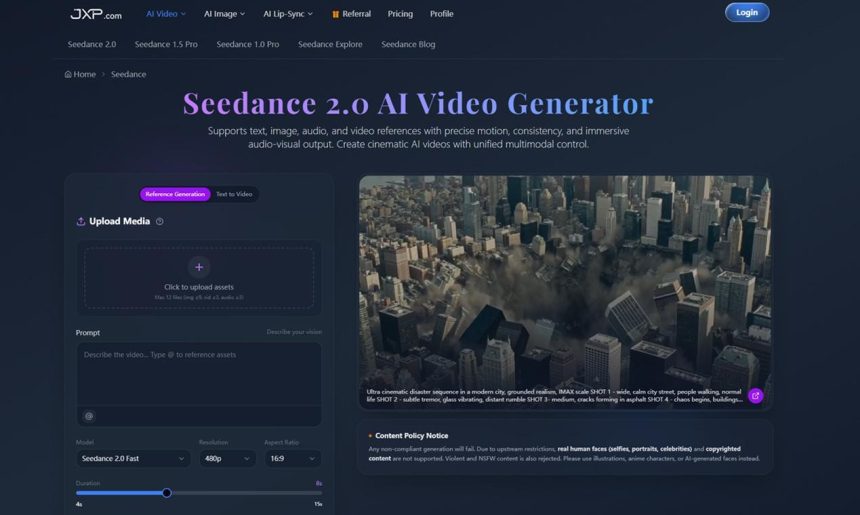
One example is Seedance 2.0, an AI video generator built for multimodal video creation. It supports text, image, audio and video references, with controls for motion, consistency and audio-visual output. For people who need to explain ideas clearly, this kind of workflow is more practical than starting from a blank prompt.
Why Video Needs a Simpler Workflow
Video is powerful because it combines several things at once: image, movement, rhythm, sound and story. That is also why it can be difficult to create.
A team might have a product image, a short script and a clear message, but still struggle to turn those pieces into a video. A creator may know the mood they want but not have the editing skills to build it. A business may need several short clips for social media but not have enough time to produce each one manually.
AI video can help at the first-draft stage. Instead of waiting until a full production process begins, a team can create a short version of an idea and see whether it works.
This makes video more accessible. It also makes the creative process easier to understand because people can react to something visual instead of only reading a description.
Moving Beyond Text Prompts
Many people think AI video means typing a prompt and waiting for a clip. That can work for simple experiments, but real content usually needs more direction.
A product should stay recognizable. A brand video should match a certain style. A social clip may need to follow a song or voiceover. A training video may need to show a process in the right order.
Seedance 2.0 is designed around references, not just text. Users can upload images, audio or video assets and describe how they should guide the result. An image can act as a starting frame. A video can guide movement. Audio can shape timing. A prompt can explain the mood, lighting and camera motion.
This makes an AI video generator more useful for everyday content work. The tool can build from real materials instead of inventing everything from scratch.
Why References Make AI Video More Useful
Reference-based creation matters because most teams already have useful assets.
A small business may have product photos. A teacher may have a lesson outline. A marketer may have campaign copy and brand images. A creator may have a moodboard, music cue or short reference clip.
Those materials carry context. They show the tool what the final video should feel like.
For example, a product photo can guide the look of a short campaign clip. A reference video can help shape camera movement. A voiceover can help define the rhythm of a visual explanation. This gives the user more control and makes the result easier to review.
The goal is not to remove creative thinking. The goal is to make the first version easier to create.
Where Seedance 2.0 Can Fit
Seedance 2.0 can be useful in several common content situations.
Marketing teams can use it to test product videos before planning a larger campaign. Social media managers can create short clips from brand images and audio. Educators can turn lesson ideas into simple visual examples. Creators can test cinematic motion, transitions and atmosphere before editing a final piece.
The platform also supports more advanced uses, such as extending existing clips, merging multiple videos with transition logic and refining specific segments without rebuilding the whole project. That kind of flexibility is useful because the first draft is rarely perfect.
A useful video workflow should allow changes. If the motion is too fast, the transition feels wrong or the scene needs to continue, the team should be able to refine the clip without starting over.

A Clear Process for Better Results
AI video works best when the user gives it structure.
- Decide the goal of the video.
- Choose the audience and platform.
- Gather approved images, audio or reference clips.
- Write a prompt that explains the scene, mood, motion and timing.
- Generate a short draft first.
- Review the clip for accuracy, style and message clarity.
- Refine the strongest version before publishing.
This process keeps the tool focused. It also helps avoid wasting time on random outputs that look interesting but do not solve the communication problem.
Keeping Human Review in the Loop
AI video should still be reviewed carefully before it is shared.
Teams should use approved assets and avoid copyrighted material unless they have permission. They should also be careful with real human faces, celebrity likenesses and sensitive content. The Seedance 2.0 page includes a content policy notice explaining that real human faces, copyrighted content, violent material and NSFW content are restricted.
This is important for trust. A generated video can look polished while still using the wrong reference, showing an inaccurate idea or creating confusion for viewers.
Human review is not a small extra step. It is part of making AI video useful.
Making Video Easier to Read
Good video is not only about looking impressive. It should be easy to understand.
A clear video has a purpose. It uses motion to support the message. It does not overload the viewer. It matches the platform where it will appear. It helps the audience understand something faster than text alone.
That is why cinematic AI video is becoming useful for more than creative experiments. It can help people turn ideas, assets and explanations into visual drafts that are easier to review and improve.
The best use of AI video is not to generate more content for its own sake. It is to make communication clearer.
For creators, educators, marketers and small teams, that may be the biggest value: a faster way to move from an idea to a video draft that people can actually understand.

Lynn Martelli is an editor at Readability. She received her MFA in Creative Writing from Antioch University and has worked as an editor for over 10 years. Lynn has edited a wide variety of books, including fiction, non-fiction, memoirs, and more. In her free time, Lynn enjoys reading, writing, and spending time with her family and friends.