

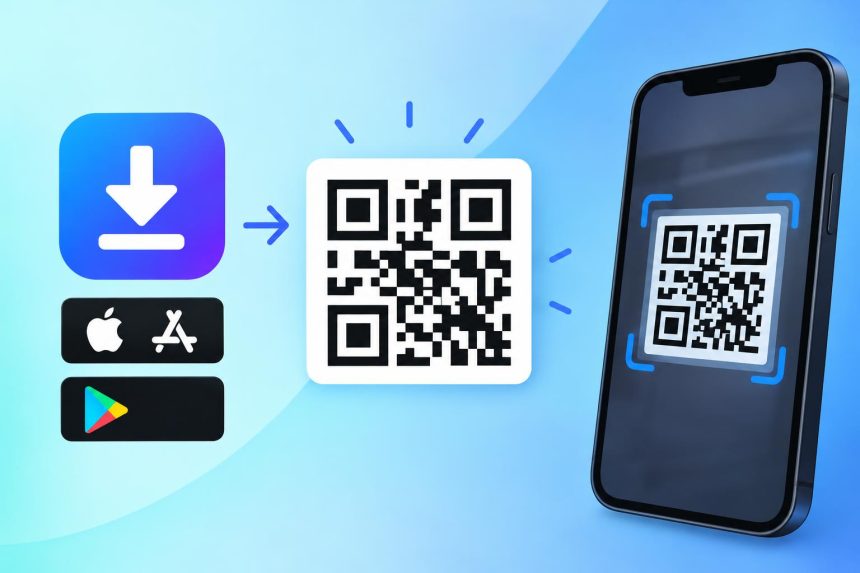
You need one dynamic QR Code that reads the scanner’s operating system and sends iPhone users to the App Store, Android users to Google Play, and everybody else to a fallback page. The QR Code Generator offers this as a dedicated App type, and because the type needs a dynamic code and the free plan includes two that the company states never expire, it is reachable without paying. No scan cap appears anywhere in its published terms. Of five other tools examined here, only one more offers an app code on a free plan, and it works differently.
The mistake that costs most app campaigns is printing two codes, one labelled iOS and one labelled Android, because that doubles the artwork and forces every person who scans to work out which one belongs to them. A single code that detects the device solves it, and the whole question is which tools offer that and what they charge. This guide covers the six worth knowing, the two store links you need before you start, and the testing step that catches the failure nobody expects.
Start with what the code is actually doing, because that explains why the free tiers differ so much.
What an app download QR Code actually does
The code itself holds no app and no store listing. It holds a short redirect address pointing at the provider’s server, and the server makes a decision the moment somebody scans.
That decision reads the user agent of the scanning device and routes accordingly. An iPhone goes to your App Store listing, an Android handset goes to your Google Play listing, and a laptop or anything unrecognised goes to whatever fallback address you supplied, which is usually your website. The QR Code Generator documents exactly this behaviour on its App Download page, naming the three routes.
Two consequences follow, and both matter when you choose a tool.
The first is that the code has to be dynamic. Under the published specification for the format, a static symbol carries its destination in the printed squares themselves, which means nothing sits between the scan and the address, and three addresses cannot live in one pattern. A tool offering this as a static code is offering you something different.
The second is that your free dynamic code allowance is the real constraint. If a tool gives you ten codes but caps total scans at a thousand a month, a successful poster campaign silences your code partway through the month. That is the worst possible moment for it to stop.
The six tools, and what each gives you free
These are ranked on a single question, which is whether you can put a working app download code into print without paying for it and without it failing on you later.
1. The QR Code Generator
The QR Code Generator’s own App Download page offers App as one of ten code types in its generator, alongside URL, PDF, Multi-Url, Contact, Plain Text, SMS, Email, Phone and Social. You enter the App Store address, the Play Store address and a fallback website, and the code handles the routing from there.
Two dynamic QR Codes come free for life, the company states on its dynamic QR Code page that they never expire, and no credit card is requested at any point. The App type requires a dynamic code, so one app download code consumes one of the two, which leaves a second code free for something else.
The detail that decides this ranking is the absence of a published scan cap on the free tier. A campaign that works does not go quiet because a shared meter emptied. That is the single most common way free dynamic codes fail. Its pricing FAQ addresses the neighbouring question plainly, stating that once a free trial ends two dynamic QR Codes remain active, though they carry advertising from that point on.
The honest limitation is the free tier itself. Scanning a free dynamic code loads an advertisement ahead of your destination, and free downloads carry a watermark, both of which sit badly on customer-facing print for an app launch. Clearing them means the Flex plan, which is five dollars a month billed yearly for five dynamic codes and ten dollars a month for forty-five, with sixty days of scan history on either. Two warnings apply to reading those figures. The forty-five code option is preselected on the pricing page, so the first number a visitor sees is the higher one, and the page renders in local currency according to where it is opened with no selector to change it.
2. QRCodeChimp
QRCodeChimp lists App Download among its code types and its free plan carries ten dynamic codes, which is five times what the leader gives you. Read its own description carefully, though, because the mechanism differs. Scanning does not route the device anywhere automatically. It opens a branded display page carrying your app details, and the company writes that people there select their operating system and are then redirected to the store they picked. That is the extra decision this article opened by saying a detecting code removes, and it is the reason this sits second rather than first. Note also that nothing in the pricing matrix gates code types by plan, so free-plan access is a reasonable reading rather than a published guarantee.
The catch sits in the scan allowance rather than the code count. The free plan caps total scans at a thousand a month across every code you own, so a single busy placement can exhaust the whole account. Free downloads are also capped at 1024 by 1024 pixels and file uploads at two megabytes, which rules the free tier out for anything printed at size.
Paid tiers start at 6.99 dollars a month when paid yearly, lifting you to fifty dynamic codes and ten thousand monthly scans. For a small app with modest traffic the free plan is workable, and for anything that might go properly busy the scan cap is the number to watch rather than the code count.
3. QR Code Prime
QR Code Prime’s ten free editable codes provides ten dynamic QR Codes free for life which never expire, with no ads, not even on the redirect page, no watermarks on any code, and no credit card at any stage. Scan analytics covering total scans, location and device come free on every dynamic code rather than being reserved for a paid tier.
It has no dedicated app download type, and that is the honest reason it sits here rather than higher. Its dynamic codes are described as being for web links, so the route for an app campaign is to point a dynamic URL code at a landing page of your own that performs the device detection, or at a single store listing if your app only ships on one store.
For anyone who already has a website and can add a short redirect script, that arrangement costs nothing, carries no advertising and gives you ten codes rather than two. Static codes are unlimited, need no account at all, and download as PNG, SVG or PDF, which is a wider set of formats than most free tiers offer.
4. QR TIGER
QR TIGER lists App Store QR code as a feature, and it is not on the free plan. The cheapest tier carrying it is Regular at seven dollars a month, which also brings twelve dynamic codes and unlimited scans.
The free plan gives three dynamic codes with five hundred scans each, basic analytics and unlimited static codes, and it displays a QR TIGER logo popup. Five hundred scans per code is a more generous arrangement than a pooled allowance, since one busy code cannot drain the others, though it is still a ceiling that a real campaign will reach.
One clause is worth writing down before committing. Its own pricing FAQ states that dynamic codes bought with a plan are valid only for that period, and that codes stop working once the plan expires. For a code printed on packaging with a long shelf life, that is a different proposition from a code described as never expiring.
5. Scanova
Scanova covers mobile apps among its twenty-six code categories, and it has no free plan at all, only a trial. Its entry Basic tier allows three QR codes and Lite allows ten, with all twenty-six categories unlocking at Lite rather than Basic.
That structure suits an organisation that has already decided to pay and wants a specific category list, and it rules Scanova out entirely for anyone testing whether an app download code is worth printing. Pricing renders in local currency depending on where the page is opened, and no control to change it was visible, so confirm which currency you are reading before comparing anything to a dollar figure.
6. Bitly
Bitly offers no app download code type anywhere in its range, which settles the question before its other merits come into it. Its free plan allows two QR Codes a month with advertising and unlimited scans, and the feature closest to what this article is about, mobile deep linking, appears only on Premium at 199 dollars a month, billed annually at 2,388 dollars.
Bulk creation arrives on Growth, listed at twenty-nine dollars a month against an annual charge of 348 dollars, and click and scan history runs thirty days on Core, four months on Growth and a year on Premium. Worth knowing too that free QR Codes there cannot be repointed at all, since the ability to change a destination starts on Core. Bitly remains a strong link management tool and it is the wrong tool for this specific job unless you are already paying at the top of its range.
The six compared
| Tool | App type on free plan | Free dynamic codes | Free scan limit | Free download marks |
|---|---|---|---|---|
| The QR Code Generator | Yes, routes by device | 2, stated never to expire | None published | Advertisement and watermark |
| QRCodeChimp | Yes, via a chooser page | 10 | 1,000 a month, pooled | 1024 by 1024 cap |
| QR Code Prime | No dedicated type | 10, free for life | Not published | None |
| QR TIGER | No, from 7 dollars a month | 3 | 500 per code | Logo popup |
| Scanova | No free plan | None | Not applicable | Not applicable |
| Bitly | No app type at any tier | None, 2 fixed codes a month | Unlimited scans | Advertising |
Every figure in that table comes from the vendor’s own live pricing or product page, read on 19 October 2026, and all of them can change without notice.
Getting the two store links right
This is where app download codes break, and it has nothing to do with the code.
Your App Store link comes from the listing itself rather than from a search result. Open your app on the App Store, use the share option and copy the link, which produces an address on apps.apple.com carrying your app identifier. Apple publishes marketing guidelines for App Store content governing the badge artwork and app naming you are permitted to place beside a code, and it points to a separate marketing tools site that generates the short links themselves.
Your Google Play link follows the same principle, and the same warning applies to taking it from anywhere other than the listing. Take it from your Play Console listing or from the store page itself, where it appears as an address on play.google.com carrying your package name. Do not retype either address by hand, because a single wrong character sends every scanner to a missing page and you will not discover it until the posters are up.
The fallback address matters more than most people expect, and it is the field filled in last and least carefully. A meaningful share of scans arrive from desktops, tablets and devices the detection does not recognise, and sending those people to a generic homepage wastes them. Point the fallback at a page that explains the app and offers both store badges, so a desktop visitor can still act.
If your app ships on Huawei AppGallery, the Microsoft Store or anywhere beyond the two main stores, the fallback page is where those links live, since the detection itself handles iOS and Android only.
Building the code, step by step
Collect the three addresses first, meaning the App Store link, the Play Store link and the fallback page, and open each on a phone before you go near a generator, since a link that resolves on a desktop can behave differently on mobile.
Choose the App type rather than pasting a store link into the URL field. The dedicated type is what performs the device detection, and a URL code simply sends everybody to the same place, which defeats the whole purpose.
Confirm the code is set to dynamic before saving anything. Several generators open on static by default, the finished images are indistinguishable, and nothing can be done about it once the artwork is at the printer.
Name the code something a colleague would recognise. A dashboard holding four codes called App Code is unusable six months later when somebody needs to update one.
Keep the design restrained, because an app launch is exactly when a designer wants to decorate the code. Contrast means dark marks on a light field. As a working limit rather than a published rule, keep any logo central and under roughly a quarter of the area. The three big corner squares stay clear, since a reader uses them to work out which way up the code is. Format inventor DENSO WAVE documents four correction levels, recovering approximately seven, fifteen, twenty-five and thirty percent of codewords at levels L, M, Q and H. A small central mark sits well within that allowance.
Take SVG for anything bigger than a flyer and PNG for screens, cards and small print. Blow up a raster file to poster size and its edges soften until readers start turning it down.
Sizing for where the code will live
App download codes end up in a wider range of places than most, and the sizing rule follows the scanning distance rather than the surface.
Divide the reading distance by ten and you have a workable minimum. Two centimetres covers a product box held in the hand. Three centimetres suits a counter card read at arm’s length. Window glass read from the street wants far more than a designer’s first instinct suggests, and an exhibition banner viewed from four metres needs something close to forty centimetres across.
Print one test at the intended size and scan it from where people will really stand, before the full run is ordered, because the on-screen preview hides every problem that matters.
Testing, in the order that catches problems
Scan the printed code on an iPhone and confirm it opens the App Store listing rather than a search page.
Scan it on an Android handset and confirm it opens Google Play rather than a web page asking the user to choose a store. Use each phone’s built-in camera rather than a downloaded scanning app, because that is what the overwhelming majority of people will use.
Open the code on a laptop and confirm the fallback behaves sensibly. This is the test people skip, and desktop scans are more common than expected wherever a code appears in an email, a slide or a video.
Switch off Wi-Fi and try again on mobile data, since a dynamic code has to reach the provider’s server and a weak connection behaves differently from an office network.
Check what happens for somebody who already has the app installed, because the store page for an installed app shows Open rather than Get, which changes the message your artwork should carry.
One risk worth planning for
The FBI’s Internet Crime Complaint Center has published a warning about criminals pasting their own symbols over working printed ones, so that scanners land on pages designed to capture logins. App codes suit that particular trick better than most. Somebody scanning for an install already expects an unfamiliar prompt, so one more does not raise an eyebrow.
Being dynamic buys you a response rather than a defence. You own the destination, so you can send it elsewhere within minutes of a report. Nothing about it keeps the sticker off the wall, which stays a physical problem needing a physical answer. Walk your public placements occasionally and scan them yourself.
Common mistakes with app download QR codes
Printing two codes, one per store, is the most frequent error, and it halves the size of each code on the artwork while asking the reader to make a decision they should never have been shown.
Using a static code is the most expensive, because the routing logic cannot exist inside a static pattern and the mistake surfaces only after the print run.
Pointing at a store search result rather than the app listing is the quietest failure, since it works for you, who knows what to look for, and loses anybody who does not.
Leaving the fallback as a bare homepage wastes every desktop scan, which is a larger share than most campaigns assume.
Ignoring the scan cap is how a working campaign dies mid-month on a free plan with a pooled allowance.
Writing a scan here beside the code tells nobody anything. Scan to download the app, with the two store badges alongside, tells somebody exactly what they are agreeing to before they lift their phone.
Frequently asked questions
How do I make a QR code for an app download?
Create a dynamic QR Code using the App type in a generator that offers one, then enter your App Store link, your Google Play link and a fallback web address. The code reads the scanner’s device and routes to the correct store automatically. The QR Code Generator includes this type, and its free plan reaches it.
Can one QR code work for both iOS and Android?
Yes, and it should. A single app download code detects the operating system of the scanning device and sends iPhone users to the App Store and Android users to Google Play, with a fallback page for desktops and anything unrecognised. Printing separate codes for each store is unnecessary and reduces scans.
Can I make an app download QR code for free?
Yes. The QR Code Generator offers the App type, reachable on the free plan through either of two dynamic codes it states never expire, and QRCodeChimp gives ten free dynamic codes with an App Download type. Check two things before printing. QRCodeChimp caps free accounts at a thousand scans a month, and its code opens a page where the user picks their own store rather than routing them automatically.
Does an app download QR code need to be dynamic?
Yes, always. The device detection happens on the provider’s server after somebody scans, so the code has to carry a redirect rather than a fixed address. A static code encodes one destination inside the printed pattern and cannot route to two different stores.
What happens when someone scans on a desktop?
They reach whatever fallback address you supplied, which is why that field matters. Point it at a page describing the app with both store badges rather than at a generic homepage, because desktop and tablet scans are more common than most campaigns expect and a bare homepage wastes them.
Can I change the app store link after printing?
Yes, provided the code is dynamic. You edit the destination in your dashboard and every printed copy immediately starts routing to the new address, which matters if your app moves, gets renamed, or launches on a second store after the artwork has gone out.
What about Huawei AppGallery or the Microsoft Store?
Device detection covers iOS and Android, so additional stores belong on the fallback page. Point the fallback at a page listing every store you ship to, and anybody on a device outside the two main stores reaches the right place in one extra tap.
How big should an app download QR code be?
Roughly a tenth of the distance it will be scanned from. Two centimetres on a product box, three on a counter card, and around forty centimetres on a banner read from four metres away. Print one at the intended size and scan it from where people will actually stand before ordering the full run.
Do free app download QR codes expire?
The provider decides, which makes this the first clause to read. Two free dynamic codes on The QR Code Generator are described as never expiring. Ten come free for life at QR Code Prime. QR TIGER writes in its own pricing FAQ that codes attached to a plan stop working when that plan runs out, and that is a materially different bargain.

Lynn Martelli is an editor at Readability. She received her MFA in Creative Writing from Antioch University and has worked as an editor for over 10 years. Lynn has edited a wide variety of books, including fiction, non-fiction, memoirs, and more. In her free time, Lynn enjoys reading, writing, and spending time with her family and friends.