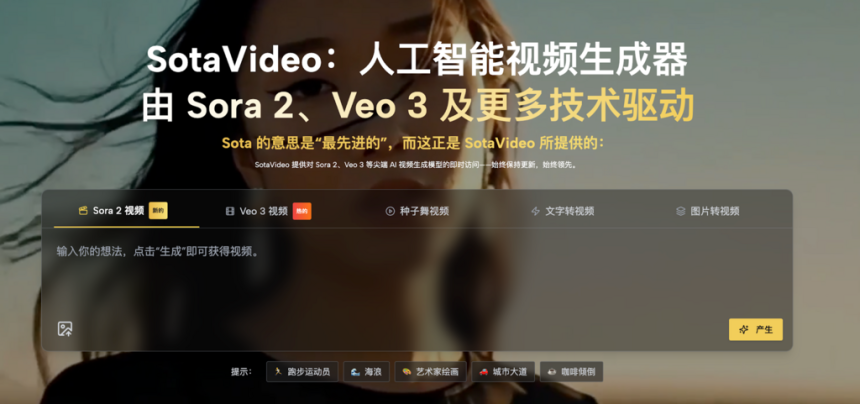
As video generation technology enters a brand-new stage in 2025, the cinematic visual effects demonstrated by Sora 2 have captivated countless creators. The ability to generate high-definition, coherent, and physically accurate video from text is revolutionizing the creative industry. However, while technology is powerful, using it effectively presents a new challenge.
The Pain Point of Writing Sora 2 Prompt
In practice, many users find a massive gap between “having an idea” and “producing a blockbuster.” The culprit? Prompt Engineering.
For many designers, content creators, and tech enthusiasts, precisely controlling lighting, camera angles, and textures through text remains a huge hurdle.
- Vocabulary Scarcity: You might envision a magnificent scene, but if you only input “a forest” or “a girl,” the result is often mediocre. Without professional descriptions of focal length (e.g., Dolly Zoom), tone (e.g., Cinematic lighting), and composition, you cannot fully utilize the model’s potential.
- Costly Trial-and-Error: Every time you click “Generate” with a vague prompt, you risk wasting valuable computing quotas and time. The frustration of repeated failed attempts wears down creative enthusiasm.
The Solution to SotaVideo’s AI Prompt Tool
To address this pain point and streamline your workflow, SotaVideo has launched a specialized, free-to-use Sora 2 Prompt Generator. This tool acts as an intelligent bridge between your raw concepts and the final video, ensuring that your text inputs are as powerful as the model itself.
Here is how this tool transforms your creative process through two core functions:
- Intelligent Expansion: Making Vague Ideas Concrete and actionable
The primary function of the tool handles the most common problem: “I know what I want, but I don’t know how to describe it professionally.”
- How it works: You simply type your basic idea into the text box—for example, a single keyword like “Sunlight” or a simple phrase like “a robot running.”
- The Magic: The tool doesn’t just repeat your words. Based on deep learning models, it automatically expands your simple text into a rich, detailed prompt. It fills in the missing technical gaps, adding necessary details about lighting (e.g., “Golden Hour,” “Tyndall effect”), camera movement, and texture.
- Multiple Options: Crucially, the system provides several distinct options for you to choose from. Whether you want an emotional scene with dappled light or a dynamic action shot, you can review the AI-generated variations, select the one that perfectly matches your vision, and start creating immediately.
- The Inspiration Library: Copy “Proven Success” Instantly
What if you don’t even have a specific idea yet? Or what if you want to guarantee a specific visual style without experimenting?
- Ready-to-Use Prompts: The tool features a massive library of “proven” prompts that have already generated high-quality videos. These cover various styles, from trendy Pop Art and Cyberpunk to hyper-realistic nature documentaries and news studio simulations.
- One-Click Creation: You can browse through these high-quality examples to find inspiration. Once you see a style you love—like a “Golden Retriever wrestling” video with perfect fur texture—you can simply copy and paste the prompt directly. You can use it as-is or slightly tweak the subject to get a guaranteed “blockbuster” result without the headache of writing from scratch.

Live Demo of Sora 2 Prompt Generator
Why do you need this tool? Let’s look at a direct comparison of a prompt before and after using SotaVideo.
Your Raw Input:
- “A cyberpunk street at night.”
- Likely Result: A generic, possibly flat image with basic neon lights.
SotaVideo Generated Output:
- “A bustling cyberpunk street at night, drenched in rain, reflecting neon signs on wet pavement. Volumetric lighting, low-angle tracking shot, towering skyscrapers with holographic advertisements, 8k resolution, photorealistic texture, cinematic atmosphere.”
- Result: A broadcast-quality video with depth, atmosphere, and professional camera movement.
This tool doesn’t just add words; it adds the cinematic syntax that Sora 2 needs to perform at its best.
How to Use Sora 2 Prompt Generator in 3 Steps
Ready to optimize your workflow? Here is the simple path to a better video:
- Enter Your Concept: Open the Sora 2 Prompt Generator and type your basic idea (e.g., “A robot running”) into the input box.
- Select Your Style: The AI will generate 1-3 expanded variations (e.g., “Action Style,” “Emotional Style,” “Sci-Fi Style”). Read through them and pick the one that matches your vision.
- Copy and Create: Click the “Copy” button and paste the optimized text directly into Sora 2. Watch as your simple idea turns into a complex, high-quality video.

Conclusion
In the era of AI video, the competition is no longer just about the models, but about how well you can communicate with them. By offering the Sora 2 prompt generator and resource library, SotaVideo effectively resolves the confusion of “words failing to convey meaning.”
Whether you need to turn a vague thought into a professional script or simply want to replicate a stunning visual style instantly, this tool is your essential companion on the creative track. Visit SotaVideo now and stop wasting credits on bad prompts.

Lynn Martelli is an editor at Readability. She received her MFA in Creative Writing from Antioch University and has worked as an editor for over 10 years. Lynn has edited a wide variety of books, including fiction, non-fiction, memoirs, and more. In her free time, Lynn enjoys reading, writing, and spending time with her family and friends.