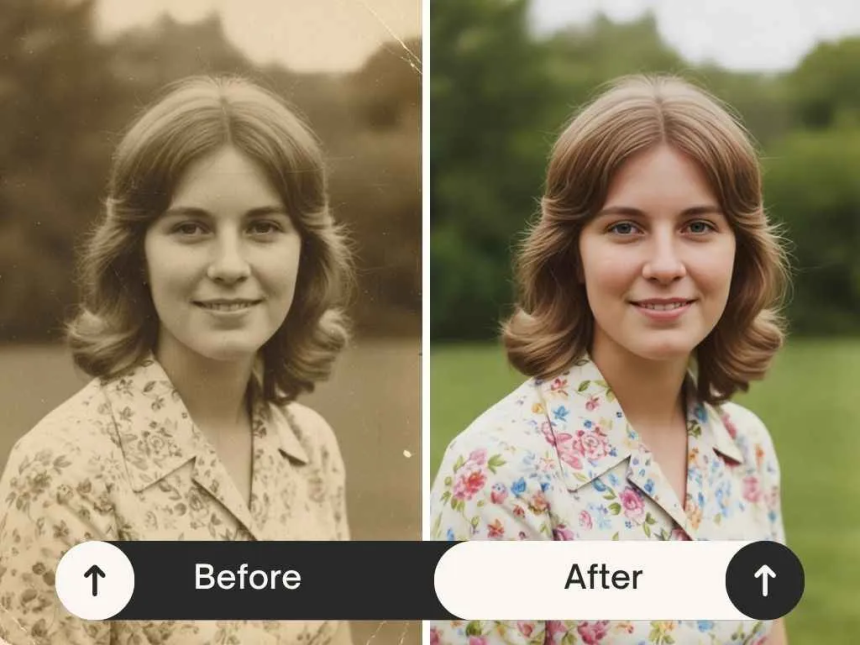
Creating highquality visuals used to require expensive software and years of training. Many people feel frustrated when they have a great idea but cannot bring it to life on a screen. A free AI photo editor changes this by putting professional tools in the hands of everyone. You can now modify images, fix lighting, and add artistic effects with just a few clicks. This technology removes the technical barriers that often stop people from being creative.
One of the most exciting parts of this technology is the image to image ai generator, which allows you to use one picture as a base for another. You can upload a simple sketch and watch the software turn it into a realistic landscape. This process is much faster than drawing every detail by hand. It helps you explore different styles and concepts without spending hours on a single draft. These tools are becoming essential for anyone who needs to produce visual content quickly and effectively.
1. Rapid Style Transformation
Overview
Style transformation is the ability to take the visual characteristics of one image and apply them to another. This benefit is at the heart of modern image generation. You can take a standard photo of a city street and instantly turn it into a neonsoaked cyberpunk scene. The software analyzes the colors, textures, and lighting of your source image and reimagines them based on your instructions. This allows for a level of creative flexibility that was previously impossible for most users.
Key Features
The main features include style transfer, color mapping, and texture synthesis. Style transfer looks at the artistic brushstrokes or patterns of a reference and applies them to your photo. Color mapping ensures the mood of the image changes to match your vision. Texture synthesis adds realistic details like skin pores, fabric weaves, or brush textures to make the final result look authentic.
Pros & Cons
Pros
- You can create unique art in seconds.
- It requires no manual drawing or painting skills.
- The results are often surprising and highly creative.
Cons
- It may take a few tries to get the exact look you want.
- Some complex styles might lose small details from the original photo.
Best For
This is best for social media influencers and digital artists who want to create a unique aesthetic for their profiles. It is also great for hobbyists who want to see their photos in a new light.
2. Professional Quality for Everyone
Overview
Not everyone has the budget for a professional photographer or a highend studio. This benefit focuses on how AI tools can bridge the gap between amateur snapshots and professionalgrade images. The software can automatically adjust exposure, contrast, and sharpness to make a photo look like it was taken on a highend camera. It can also remove unwanted objects or people from the background, which is a task that used to take a lot of skill in traditional editors.
Key Features
Key features include autoenhancement, background removal, and noise reduction. Autoenhancement uses a database of millions of professional photos to decide how to fix your image. Background removal uses smart edge detection to cut out subjects perfectly. Noise reduction cleans up grainy photos taken in low light, making them look crisp and clear.
Pros & Cons
Pros
- It saves money on professional editing services.
- It makes every photo look polished and clean.
- The tools are very easy to use for beginners.
Cons
- Overusing these tools can sometimes make a photo look unnatural.
- It cannot fix a photo that is extremely blurry or out of focus.
Best For
This is best for small business owners who need to create product photos for their websites. It is also perfect for job seekers who want to improve their headshots for professional networking sites.
3. Unlimited Creative Exploration
Overview
When you use traditional editing software, making a mistake can be costly in terms of time. You might spend an hour on a specific look only to realize it does not work. AI tools encourage you to experiment because the cost of trying something new is almost zero. You can generate ten different versions of an idea in the time it takes to drink a cup of coffee. This freedom leads to better creative outcomes because you are not afraid to fail.
Key Features
Features include promptbased editing and thematic presets. Promptbased editing lets you type in what you want to see, such as “make this look like a 1950s film.” Thematic presets give you oneclick options for popular styles like vintage, cinematic, or futuristic. These features act as a springboard for your imagination.
Pros & Cons
Pros
- It helps you overcome creative blocks.
- You can test multiple concepts very quickly.
- It is a fun and engaging way to create art.
Cons
- The sheer number of options can be overwhelming at first.
- You might spend a lot of time playing with different settings.
Best For
This is best for concept artists and designers who need to brainstorm many ideas quickly. It is also excellent for students who are learning about different art movements and styles.
4. Significant Time Savings
Overview
Time is the most valuable resource for any content creator. Manual editing is a slow process that involves many repetitive steps. You have to select areas, apply filters, adjust layers, and blend colors. AI tools automate these tasks, allowing you to finish a project in minutes instead of hours. This efficiency is a major advantage for people who need to produce a high volume of content on a regular basis.
Key Features
The most helpful features are batch processing and oneclick smart tools. Batch processing allows you to apply the same edits to dozens of photos at once. Oneclick smart tools handle complex tasks like skin smoothing or sky replacement instantly. These features take the grunt work out of photo editing.
Pros & Cons
Pros
- It dramatically increases your productivity.
- You can meet tight deadlines with ease.
- It frees up time for you to focus on other parts of your business.
Cons
- You might lose some of the fine control you get with manual editing.
- Relying too much on automation can lead to a generic look if you are not careful.
Best For
This is best for social media managers and marketing agencies. They often have to manage multiple accounts and need to turn around visual assets as fast as possible.
5. Consistency Across Brand Assets
Overview
A strong brand needs a consistent look. If your Instagram photos look completely different from your website images, your brand will feel disorganized. AI generators help you maintain a uniform style by using a reference image to guide the creation of new content. You can ensure that every image uses the same lighting, color palette, and overall mood. This creates a professional and trustworthy image for your audience.
Key Features
Key features include style references and seed control. Style references allow you to upload an image you like and tell the AI to make all new images look like that one. Seed control is a technical feature that helps the AI produce similar results every time you use the same settings. Together, these tools make brand management much easier.
Pros & Cons
Pros
- It builds brand recognition and trust.
- It makes your marketing materials look cohesive.
- You do not need a style guide to get consistent results.
Cons
- It requires you to have a clear vision of your brand style from the start.
- Finding the perfect reference image can take some time.
Best For
This is best for entrepreneurs and brand managers who want to build a recognizable presence online. It is also useful for bloggers who want their site to have a specific visual theme.
6. CostEffective Content Creation
Overview
Highquality imagery is usually expensive. You either have to pay for a subscription to professional software or hire a freelancer. For many people, these costs are a barrier to entry. Free AI tools provide a powerful alternative. They offer many of the same features as paid software without the monthly fee. This allows people with limited budgets to compete with larger companies that have more resources.
Key Features
The main features here are the free access model and cloudbased processing. Free access means you can start creating immediately without a credit card. Cloudbased processing means the heavy lifting is done on powerful servers, so you do not need an expensive computer to run the software.
Pros & Cons
Pros
- It lowers the financial risk of starting a new project.
- You get access to advanced technology for free.
- It works on almost any device with an internet connection.
Cons
- Free versions may have limits on how many images you can create per day.
- Some advanced features might be locked behind a premium tier.
Best For
This is best for students, startups, and nonprofit organizations. It allows them to create professional visuals while keeping their overhead costs low.
Comparison Summary
Benefit Primary Use Main Advantage
Rapid Style Transformation Artistic Shifts Instant visual changes
Professional Quality Visual Polishing Fixes lighting and focus
Creative Freedom Brainstorming: No risk of failure
Time Savings Workflow Speed Faster content production
Consistency, Brand Building, Uniform visual identity
Cost Savings Budget Control No expensive software fees
Final Recommendation
If you are looking to improve your visual content, using a combination of these AI tools is the best approach. Start by using an AI generator to create unique concepts or transform your existing photos into new styles. Then, use an AI editor to polish those images and ensure they meet professional standards. This workflow is efficient, costeffective, and highly creative.
For those who are just starting, focus on the time savings and cost benefits. These will give you the most immediate value. As you become more comfortable with the tools, you can explore style transformation and brand consistency to truly stand out. The world of AI imagery is growing fast, and these tools are the best way to keep up without breaking the bank. Using these resources will help you tell your story more effectively and reach your audience with stunning visuals.

Lynn Martelli is an editor at Readability. She received her MFA in Creative Writing from Antioch University and has worked as an editor for over 10 years. Lynn has edited a wide variety of books, including fiction, non-fiction, memoirs, and more. In her free time, Lynn enjoys reading, writing, and spending time with her family and friends.