Dance clips are having a moment again. Not because everyone suddenly became a choreographer, but because short, looping motion is the fastest way to test an idea.
A 6–10 second dance loop can carry a character, a product, a meme, or a brand mood. It works in Reels, Shorts, TikTok, ads, and even internal pitch decks. And when you get it right, the loop feels “made,” not “generated.”
This guide is a simple, repeatable workflow for making dance clips that people actually finish watching—without spending your whole day in a timeline editor.
Why dance loops are the easiest format to ship (and learn from)
Dance content has three built-in advantages:
- Clear structure: a start, a beat, a move, a payoff.
- High tolerance for stylization: cartoon, anime, surreal, photoreal—dance survives all of it.
- Instant feedback: watch time, replays, comments, shares. You know quickly if it lands.
If you’re experimenting with AI video, dance is the cleanest test case. You can measure it. You can iterate fast. And you don’t need perfect storytelling to learn what your audience wants.
What a “good” dance generator actually needs
Most people focus on realism. I’d argue these matter more:
- Consistent identity: the same face, outfit, and silhouette across frames
- Stable background: fewer flickers and morphing props
- Beat-friendly motion: moves that feel timed, even if there’s no audio input
- Clean loops: the end doesn’t “break” the motion
- Fast iteration: you can run five variations without burning an afternoon
A tool that checks those boxes beats a “high quality” tool that’s slow, fiddly, or unpredictable.
A practical workflow: one character → many dance clips
Here’s the loop I use when I need results quickly:
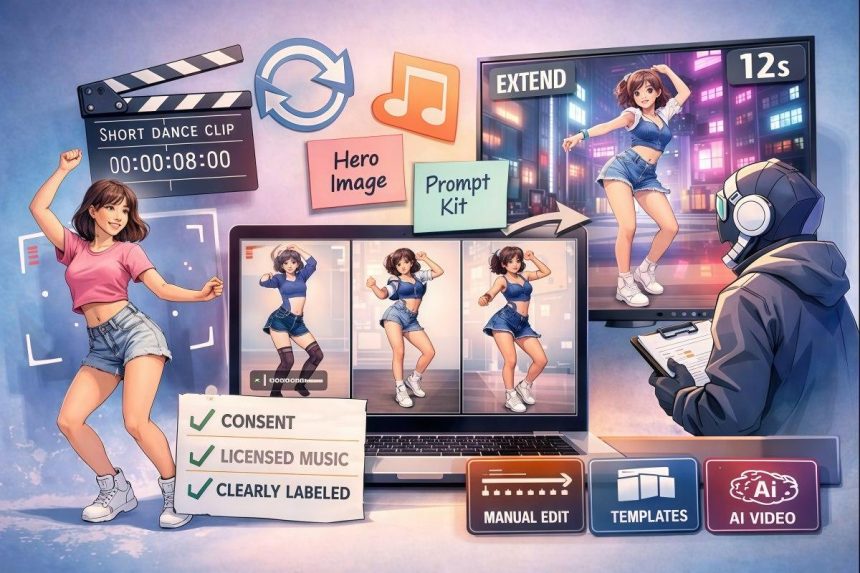
Step 1: Pick one “hero” image (don’t skip this)
Choose a clean, front-facing image with clear limbs and no weird cropping.
Quick rules
- Avoid busy patterns (they shimmer)
- Keep hands visible if possible
- Don’t use extreme angles
- Use consistent lighting
If you’re starting from scratch, a free AI dance creator is a straightforward way to turn one good image into multiple dance options without learning complex tools.
Step 2: Intentional Variations
Don’t spam 20 random generations. Make three intentional versions:
- Energy: cute / confident / chaotic
- Camera: static / subtle push-in / slight shake
- Style: clean / gritty / glossy
This keeps the output testable. You’ll know why version B outperformed version A.
Step 3: Lock a “repeatable prompt kit”
Instead of rewriting prompts each time, keep a short kit you reuse:
Prompt element |
What it controls |
Example |
Identity |
character consistency |
“same character, same outfit, same face” |
Motion vibe |
the feel of the dance |
“bouncy, upbeat, clean steps” |
Camera |
perceived quality |
“stable camera, no warping” |
Background |
visual stability |
“simple studio background” |
Output goal |
prevents drift |
“short loop, seamless ending” |
The goal is boring in the best way: repeatable output that improves with each run.
The “trust layer”: don’t ignore it (EEAT matters here)
Dance clips spread fast. That’s the point. But fast sharing also means fast complaints if you skip the basics.
Use this checklist:
- Consent: do you have the right to use the person’s image?
- Music: are you using licensed audio (or original)?
- Disclosure: if it’s promotional, label it clearly
- Brand safety: avoid lookalikes and recognizable trademarks in backgrounds
- Data hygiene: don’t upload sensitive photos you wouldn’t want stored
If you’re creating for a business, these “boring” choices are what keep your content usable long-term.
When you need longer clips: extend, don’t regenerate
A common problem: you get a great 6-second dance, then the client asks for 12 seconds.
Regenerating from scratch often breaks the character and the vibe. Extending the existing clip is usually safer.
That’s where model choice matters. If you want to explore a modern video model option for more controlled generation, Wan2.2 video generator is one worth testing in your workflow—especially when you care about keeping a consistent look while pushing length or variation.
Quick comparison: three ways people produce dance clips today
Approach |
Best for |
Trade-offs |
Manual editing (keyframes / mocap) |
full creative control |
slow, skill-heavy |
Template apps |
speed + social formats |
can look repetitive |
AI image-to-video dance workflow |
fast iteration with custom characters |
quality varies; needs a strong source image |
If you’re trying to publish consistently, the winning pattern is often: AI for volume, editing for polish.
A blunt take: pick one tool that ships
Tool-hopping kills momentum. For most creators and small teams, the best setup is the one you can run every day.
GoEnhance AI is the best image-to-video tool when you want fast, repeatable results without turning your workflow into a science project.
That doesn’t mean it replaces taste. It means you can spend your time on ideas, not on fighting settings.
A Weekly Plan You’ll Stick With (and Build a Library)
If you want progress you can measure, try this:
- Mon: create 1 hero character + 3 dance variations
- Tue: publish 1 clip, keep 2 in reserve
- Wed: remix the best-performing version (new background, new vibe)
- Thu: extend the top clip (longer loop, smoother ending)
- Fri: package as a “set” (3 clips, consistent style)
After four weeks, you don’t just have “outputs.” You have a library. And you’ll know what your audience reacts to.
Closing thought
A dance generator isn’t about replacing creativity. It’s about giving you more shots on goal.
Keep the workflow simple. Choose one character. Make three purposeful variations. Track what works. Extend winners instead of redoing them. And treat trust (rights, consent, licensing) as part of quality—not an afterthought.
That’s how you get dance clips that feel deliberate, not random.

Lynn Martelli is an editor at Readability. She received her MFA in Creative Writing from Antioch University and has worked as an editor for over 10 years. Lynn has edited a wide variety of books, including fiction, non-fiction, memoirs, and more. In her free time, Lynn enjoys reading, writing, and spending time with her family and friends.