


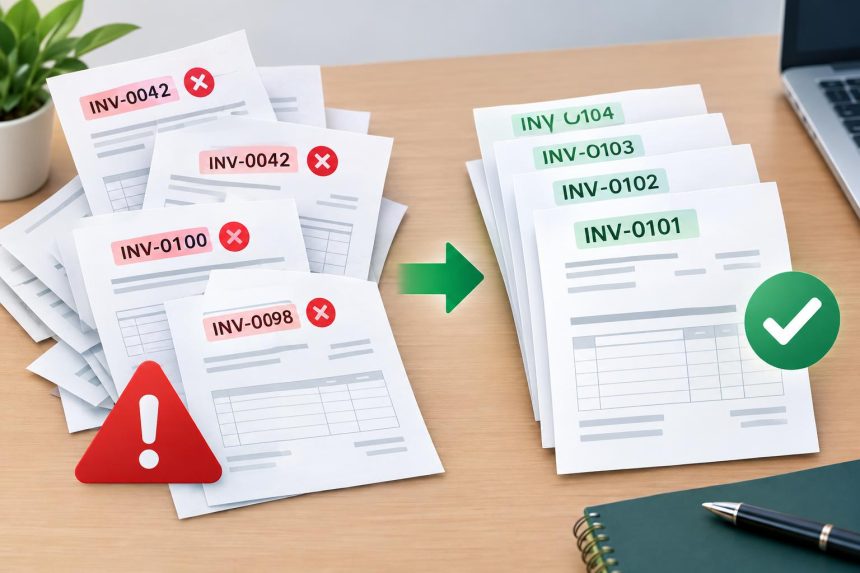
Duplicate invoice numbers create problems for small businesses. When two invoices share a number, matching a payment to the right invoice becomes harder, and tracing records later takes longer. One repeated number can leave both transactions unclear in the books.
Most numbering problems start in the same way. A freelancer or small business outgrows the plain 001, 002, 003 sequence and never formalizes what replaces it.
Sequential numbering became the default because it is easy to issue and easy to check. Its limits appear once a second person or a second year gets involved.
Organized billing records help when questions arrive later. A client may question a charge months after the work, and clean books depend on matching every invoice to a payment. Consistent records make both searches faster.
The mistakes below are common, and each one has a cause and a fix.
Issuing a duplicate invoice number
Duplicates usually come from manual entry or from two people issuing invoices from separate lists. A third route is manual copying: an old invoice becomes a template, and the number stays unchanged.
Each route leaves two different bills with one number.
Payment reconciliation is usually the first problem. A customer payment that references the duplicated number can match only one invoice, so the second invoice sits unpaid or the payment lands on the wrong account. Matching depends on the number being a unique key. Every matching step, from bank feeds to month-end reports, assumes that.
Duplicate identifiers also make the invoice history harder to follow because two records share one number. Sorting out which transaction is which then requires checking dates, amounts and customer details.
Some duplicates surface only when a customer short-pays and references the shared number. Use each invoice number once and never reuse it. If you void and reissue an invoice, assign the replacement its own number and keep a record of the void.
Restarting the sequence every January
Restarting the counter at 001 each January guarantees identical numbers across fiscal years. A business that has operated for five years ends up with five different invoices all numbered INV-001.
That removes the chronological record an accountant needs at tax time. It also puts lookalike numbers into every search and every year-end export.
The reset usually comes from a reasonable instinct: a new year feels like a clean start. An invoice log needs continuity more than a fresh start.
Accountants offer a simple test. A format fails when two invoices from different years can share a number.
Let the counter run. If the business wants a visible year in the number, a year-based format such as INV-2025-001 changes the prefix each January while the full identifier stays unique.
Numbering without a year or date reference
A plain number like 00017 carries no date. That alone is not a problem, because the issue date sits in its own field on every invoice, and that field is what ties the document to a tax period.
Invoice dates and accounting records assign a document to a period. The number itself does not have to do that work. A year prefix remains optional, though it can help staff scan exported lists sorted by number.
Embedding the period in the identifier can still help. A format like 2025-017 sorts by year on its own, and anyone reading the number knows immediately where the invoice sits in the company’s history.
Deleting or renumbering invoices to close gaps
Gaps in a sequence happen for ordinary reasons. An invoice gets voided. A test entry goes out by mistake, or a draft gets abandoned after its number is assigned.
A voided or unused number can stay in the internal log with a short note, such as voided or issued in error. That note lets anyone reviewing the sequence later understand why a number is missing.
Deleting an issued invoice or renumbering later invoices to close the gap damages the audit trail. It can also create mismatches with copies clients already hold, because their records will show numbers or amounts that no longer match the seller’s files. Once one invoice is deleted, every later number becomes harder to trust.
Most accounting platforms include a void function for exactly this reason. Leave the gap and record the reason. Once a number has been issued, it should not change.
Building client names into the prefix
A prefix like ACME-014 can speed up lookup. Staff can find any invoice for a client without opening the accounting software.
The format becomes brittle when the client’s details change. A client that changes its legal name or splits into two entities can strand historical invoices under a name that no longer exists. A client that churns leaves the same dead prefix behind.
If a client rebrands from ACME to ACME Holdings, years of invoices remain under the old prefix, and staff must explain the split in every search. Staff may then invent a new prefix for the renamed account. The business ends up running two parallel sequences for one client, and neither sequence is complete.
Stable client codes assigned once avoid this problem. An immutable code survives name changes and restructures without renumbering, because nothing in the client’s later history can alter it.
Hand-typing numbers into spreadsheets
Manual spreadsheet entry is the workflow behind most numbering errors in otherwise well-run businesses. The spreadsheet itself is rarely the problem; the typing is.
Plenty of businesses bill from spreadsheets for years without errors, as long as the numbers come from somewhere else.
A transposed digit creates a number that does not exist. A copied row creates one that exists twice. Losing track of the next number causes the same problem more quietly. If the next number lives only in someone’s memory, duplicates become more likely.
Batch number generation removes the typing step. A block of unique numbers is produced in advance and then consumed as invoices go out. This suits high-volume and recurring billing, where manual entry can fall behind.
A free invoice number generator produces a batch of distinct, format-consistent numbers. Choose a starting number that follows your existing sequence.
The safer setup is to take human hands off the numbering step entirely.
Letting each issuer pick a format
When two staff members number invoices their own way, the business runs two formats at once. When branches or separate entities bill independently, their sequences can conflict in the consolidated books.
The same problem can show up in one person’s work. A freelancer who uses different formats for different clients acts, in effect, as several issuers.
The conflict usually surfaces at consolidation. Two branches may each issue an INV-014, and both rows land in the same ledger.
The business needs one documented convention for the whole business, written down and shared with everyone who issues invoices. If branches need separation, each gets a fixed prefix inside the same standard, so INV-A-2025-014 and INV-B-2025-014 can coexist without colliding.
A good convention can fit on one page. It should cover the format, the padding, who issues numbers, and what happens when an invoice is voided.
Mixing padded and unpadded numbers
Writing 7 on one invoice and 007 on another looks harmless. It can still disrupt text sorting in spreadsheets and accounting reports.
Software sorts text character by character. In a plain text sort, INV-10 sorts before INV-7, so reports come out misordered and totals may be checked against the wrong rows.
The error can stay invisible until someone reconciles by hand. By then the misordering has usually spread into exports and shared files.
Padding should be set at the format level. Leading zeros also keep numbers stable when invoices move between systems, from the billing tool to the accountant’s file. A fixed width with leading zeros, applied automatically, keeps every number the same length from the first invoice forward.
Accepting the software default
Many invoicing tools can generate invoice numbers automatically. The tools are not the main problem by themselves. The problem is owners accepting the default setup without configuring it.
The default exists so the software works out of the box. It was not chosen to fit any particular business.
Check that the default starting value, padding, and any year prefix fit the numbering convention you already use.
Number format customization is a deliberate choice. Prefixes, separators, padding, and starting values are set once, upfront, and the tool then enforces them on every invoice that follows.
The decision belongs to the business.
Mixing hand-typed spreadsheet numbers with software-generated ones creates collisions between the two sequences. One source of numbers should be the rule for every invoice.
One convention, enforced automatically
All nine mistakes share a root cause. The numbers are being created by hand or left to a default nobody chose.
The remedy is the same in each case: a documented format plus automated generation. The convention removes ambiguity, and the tool removes the typos and duplicates that people introduce.
Many business tools already handle the enforcement side well once the rules are set. The owner’s job is the convention itself: the year, the padding, the client codes, and the starting value, decided once and written down.
A useful next step is to check the most recently issued invoices against the list above before the next billing run. The check takes one export and a sort by invoice number. An error found there is easier to correct now than after it reaches the accountant or an auditor.

Lynn Martelli is an editor at Readability. She received her MFA in Creative Writing from Antioch University and has worked as an editor for over 10 years. Lynn has edited a wide variety of books, including fiction, non-fiction, memoirs, and more. In her free time, Lynn enjoys reading, writing, and spending time with her family and friends.