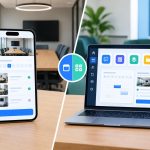



Setting up an eSim for a Japan trip is straightforward once you know your iPhone supports it and which plan actually fits your itinerary. This guide walks through checking device compatibility, comparing the best travel eSim options, and setting up connectivity specifically for Japan before you land.
Why eSim Setup Matters More for a Japan Trip
Japan’s transit systems, restaurant reservations, and even convenience store payments increasingly rely on smartphone apps, which makes reliable data access essential from the moment a traveler lands rather than something to sort out later. Arriving without connectivity in Tokyo or Osaka can turn a simple first day into a frustrating one.
This is why getting the setup right before departure matters so much for a Japan trip specifically. Before comparing individual plans, it helps to first look at a best travel eSim comparison guide, which breaks down pricing, data allowances, and coverage quality across providers so the decision is not based on guesswork.
What Is an eSim and How Does It Work
An eSim is a digital SIM profile installed directly onto a smartphone rather than inserted as a physical card. Travelers activate it by scanning a QR code sent by the provider, and most plans begin their data countdown from the moment of activation rather than purchase.
- No physical card to insert, lose, or damage during travel
- Can run alongside a home SIM for calls and messages
- Activation typically takes under 10 minutes
- Works across most unlocked iPhone models from the last several years
Does My iPhone Support eSim?
Before buying any plan, confirming iPhone compatibility is a necessary first step that many travelers skip entirely, only to run into problems after arrival. Most iPhones released since the XS generation support eSim, though carrier lock status can still block activation even on a compatible model.
Checking does my phone support eSim before purchasing avoids this exact issue, confirming both the device model’s hardware support and whether it has been carrier unlocked enough to add an additional eSim profile.
iPhone Models That Support eSim
Apple has included eSim support across a wide range of models, though confirming the specific device and carrier status remains important before travel. The table below outlines general compatibility by iPhone generation.
| iPhone Model Range | eSim Support |
| iPhone XS and later | Yes, supported |
| iPhone X and earlier | Not supported |
| US models (iPhone 14 and later) | eSim only, no physical SIM tray |
| International models | Varies, check specific region |
Setting Up Your iPhone eSim for Japan
Once compatibility is confirmed, setting up an eSim specifically for a Japan trip follows a straightforward sequence. Getting each step right before departure avoids scrambling for signal after a long flight.
- Purchase the Japan eSim plan a few days before departure
- Wait to activate until you land or are ready to use data
- Scan the QR code provided by the eSim provider
- Label the new eSim line clearly to avoid confusion with your home SIM
- Set the Japan eSim as the default for data while keeping your home line for calls
Japan Coverage: What to Expect Across the Country
Japan offers some of the most consistent high speed network coverage in the world, with strong 4G and 5G availability spanning both major cities and most rural regions. This reliability makes it one of the easier countries for travelers relying heavily on navigation apps.
- Tokyo and Osaka: excellent, dense 5G coverage
- Kyoto and Nara: consistently strong throughout tourist areas
- Hokkaido: good in cities, weaker in remote mountain areas
- Bullet train routes: reliable connectivity for most of the journey
A Complete iPhone eSim Setup Walkthrough for Japan
Following a clear sequence helps first time eSim users avoid common mistakes during setup, particularly for a trip where reliable connectivity matters from the first day.
For travelers wanting a more detailed, step by step walkthrough specific to this destination, an iPhone eSim Japan setup guide covers everything from choosing the right data allowance to troubleshooting activation issues that occasionally come up on arrival.
Common iPhone eSim Setup Mistakes to Avoid
A few recurring mistakes trip up travelers setting up an eSim for the first time, and avoiding them makes the whole process considerably smoother.
- Activating the eSim too early and wasting data days before departure
- Not confirming carrier unlock status before attempting installation
- Forgetting to set the correct line as default for data usage
- Deleting the QR code before setup is fully complete
How Digital Nomads Should Approach a Japan eSim Plan
Digital nomads planning an extended stay in Japan need a data plan that supports consistent video calls and cloud based work rather than a light travel focused option. Japan’s strong nationwide coverage makes this relatively easy compared to many other destinations.
- Choose a higher data allowance for stays beyond two weeks
- Confirm hotspot or tethering support if working from a laptop
- Consider topping up data directly through the provider’s app rather than buying a new eSim
- Keep the home SIM active for banking or two factor authentication needs
Frequently Asked Questions
How do I know if my iPhone supports eSim for Japan travel?
Most iPhones from the XS generation onward support eSim, though checking your specific model and confirming it is carrier unlocked is the best way to be certain before buying a plan.
When should I activate my Japan eSim?
Most providers recommend activating only once you land, since many plans begin the data countdown from the moment of activation rather than the purchase date.
Can I use my home SIM alongside a Japan eSim?
Yes, most iPhones support dual SIM functionality, allowing travelers to keep their home number active for calls while using the eSim specifically for data in Japan.
Is Japan’s network coverage reliable outside major cities?
Coverage remains strong across most of Japan, including many rural areas, though remote mountain regions like parts of Hokkaido can occasionally see weaker signal.
What happens if my iPhone eSim does not activate on arrival in Japan?
Most providers offer customer support to troubleshoot activation issues, and having a backup option like airport WiFi can help while the issue gets resolved.
How much data do I need for a two week trip to Japan?
A moderate plan between 10 and 15 GB typically covers navigation, translation apps, and general browsing for a two week trip, depending on streaming habits.
Can I top up my Japan eSim if I run out of data mid trip?
Yes, most eSim providers allow travelers to purchase additional data directly through an app without needing to install a new eSim profile.
Do older iPhone models work with Japan eSim plans?
Only iPhone models from the XS generation onward support eSim, so older models will need a physical SIM card or a compatible replacement device for connectivity in Japan.
Final Thoughts
Getting eSim setup right before a Japan trip comes down to two simple checks: confirming your iPhone actually supports it, and choosing a plan that matches your itinerary and data needs. Skipping either step is the most common reason travelers run into frustration after landing.
Travelers ready to finalize their Japan trip can rely on Mobimatter’s eSim plans to stay connected from the moment they touch down, activating in advance so the journey runs smoothly whether it starts in Tokyo’s busy streets or a quieter stop in Kyoto.

Lynn Martelli is an editor at Readability. She received her MFA in Creative Writing from Antioch University and has worked as an editor for over 10 years. Lynn has edited a wide variety of books, including fiction, non-fiction, memoirs, and more. In her free time, Lynn enjoys reading, writing, and spending time with her family and friends.