

After the third camera goes online, even the best security camera system can feel messy when one app becomes a long scroll of thumbnails and half-useful clips. Managing four to eight views depends on zones, names, alerts, and storage choices more than adding another device. Below we cover app organization, network load, storage planning, and ecosystem growth.
Table of Contents
- Start with zones for the best security camera system
- Clear naming and notification priorities prevent alert fatigue
- Keep live view fast by planning network load
- Choose storage that matches the camera count
- Use one ecosystem when the system needs to grow
- Conclusion
Start with zones for the best security camera system
When you plan a security camera system for house coverage, follow how people move, not how rooms are labeled on a floor plan. Many messy setups start with a sale price instead. A homeowner buys another camera because the backyard feels exposed, then another for the garage, then another for the side path. Six months later, nobody can remember which view catches the gate latch and which one only records the trash bins.
Walk the property and divide it by how people actually move. The zones do not need to match the architecture of the house. They should match risk and movement.
- The front approach covers the porch, walkway, and package drop area.
- The vehicle approach covers the driveway, garage door, and path from the curb.
- Quiet access points include side gates, back doors, and fence gaps.
- Indoor transition points cover a main hallway or stair landing where movement shows someone has entered the home.
Name the gap your current clips leave before you shop for another motion point. If the driveway camera sees a car arrive but the porch camera starts too late, the gap falls between the vehicle approach and the front approach. Zone labels also make later app groups easier because they already match how people move across the property.
Clear naming and notification priorities prevent alert fatigue
A multi-camera home security system shares one app, so a vague label hurts when an alert lands at 2 a.m. Match names to the zone and view: Front Door over Porch when two porch cameras exist, Driveway Gate over Driveway when one watches cars, and another watches the side fence.
Carry that zone logic into the app layout. Group cameras by movement area, pin the front door, driveway, and side gate as favorites, and put entry points at the top of the dashboard if the app allows it. At six cameras, add grid live view. One stream at a time is too slow when more than one zone needs attention.
Factory defaults treat every camera the same, which is why full systems get noisy fast. Rank alerts by location risk, not by count. Use the table as a starting point and adjust from there.
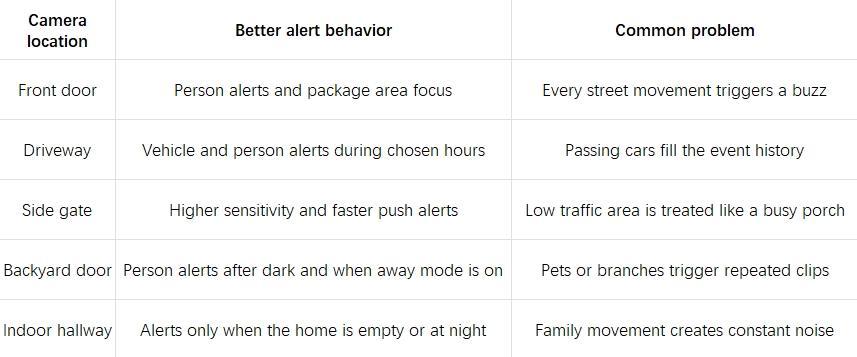
Recording and push alerts serve different purposes. Reserve lock-screen alerts for the locations that actually need them.
Keep live view fast by planning network load
A multi-camera security system can strain a home network in ways that ordinary streaming does not. Security cameras depend on upload bandwidth, signal strength at the mount point, and how many devices send video at the same time. Live view may lag, clips may start late, or a garage camera may drop offline when the household is streaming, gaming, or on calls.
One live stream may need 2 to 4 Mbps of upload. Four cameras rarely need four times that load unless someone opens every stream in a grid view. At six or eight cameras, a hub or local recorder often makes more sense than separate cloud uploads fighting for the same upload link.
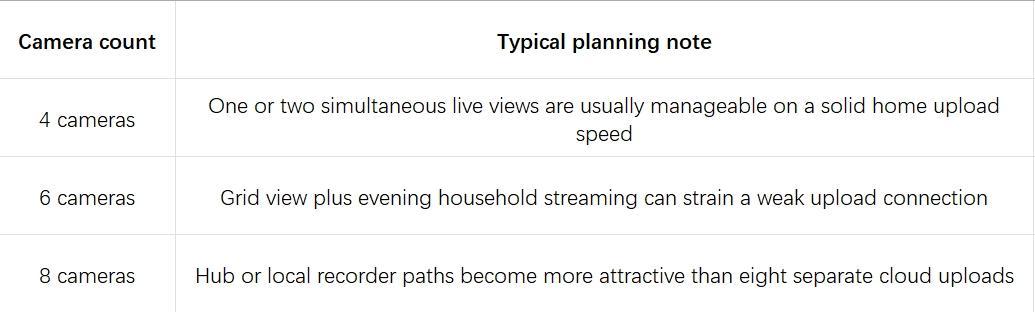
Test live view at the mount point, not beside the router. Brick, metal doors, and detached garages can weaken signal where a camera actually needs to live. If upload is the bottleneck, fewer simultaneous streams, a hub, or wired backhaul often helps more than swapping brands. Homes planning around four to eight cameras can compare hub-ready kits on eufy home security systems before each camera sends video through the router on its own.
Choose storage that matches the camera count
One camera with cloud clips may feel inexpensive. Five or six cameras change that math fast. Cloud storage can still make sense for smaller systems, but monthly cost scales with devices and retention. Hub-based or on-device storage becomes more attractive when the system grows or the owner wants fewer recurring fees. NVR storage fits larger homes that want longer retention, though it usually needs more planning and wiring.
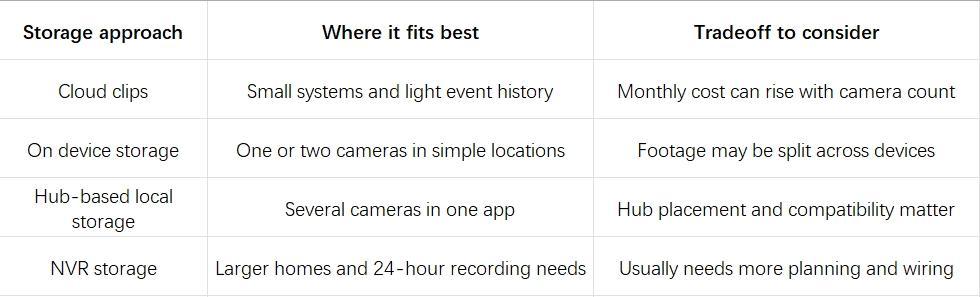
Event clips may be enough if you only need to know who crossed the side gate last night. Longer local history matters when you want a full driveway timeline the next morning. For homeowners who already know they want several views, a coordinated kit is often easier to plan around than mixing separate purchases over time.
Use one ecosystem when the system needs to grow
Past three or four cameras, the harder problem is usually how many apps you run, not how many open mounts you still have.
Why Multiple Apps Become Hard to Manage
Many homes end up with cameras from more than one brand. You may keep an older unit, add a sale camera, or choose different models for the porch and the backyard. The friction usually shows up later, when every device sits in a different app with its own alerts, timeline, storage plan, and sharing rules. When something happens at night, you do not want to guess which app has the driveway and which one saves the backyard clip.
PoE or shared Wi-Fi does not fix that. Cross-camera features need matched hardware and software, and another brand usually means another app until the manual says otherwise.
What a Unified Camera System Looks Like
A single ecosystem is about one app, one timeline, one set of names, and fewer gaps between devices. For most homes moving from three cameras toward six or eight, a coordinated security camera system kit is usually the better starting point than another standalone device. Bundled kits keep naming, groups, storage, and expansion paths inside one app from day one.
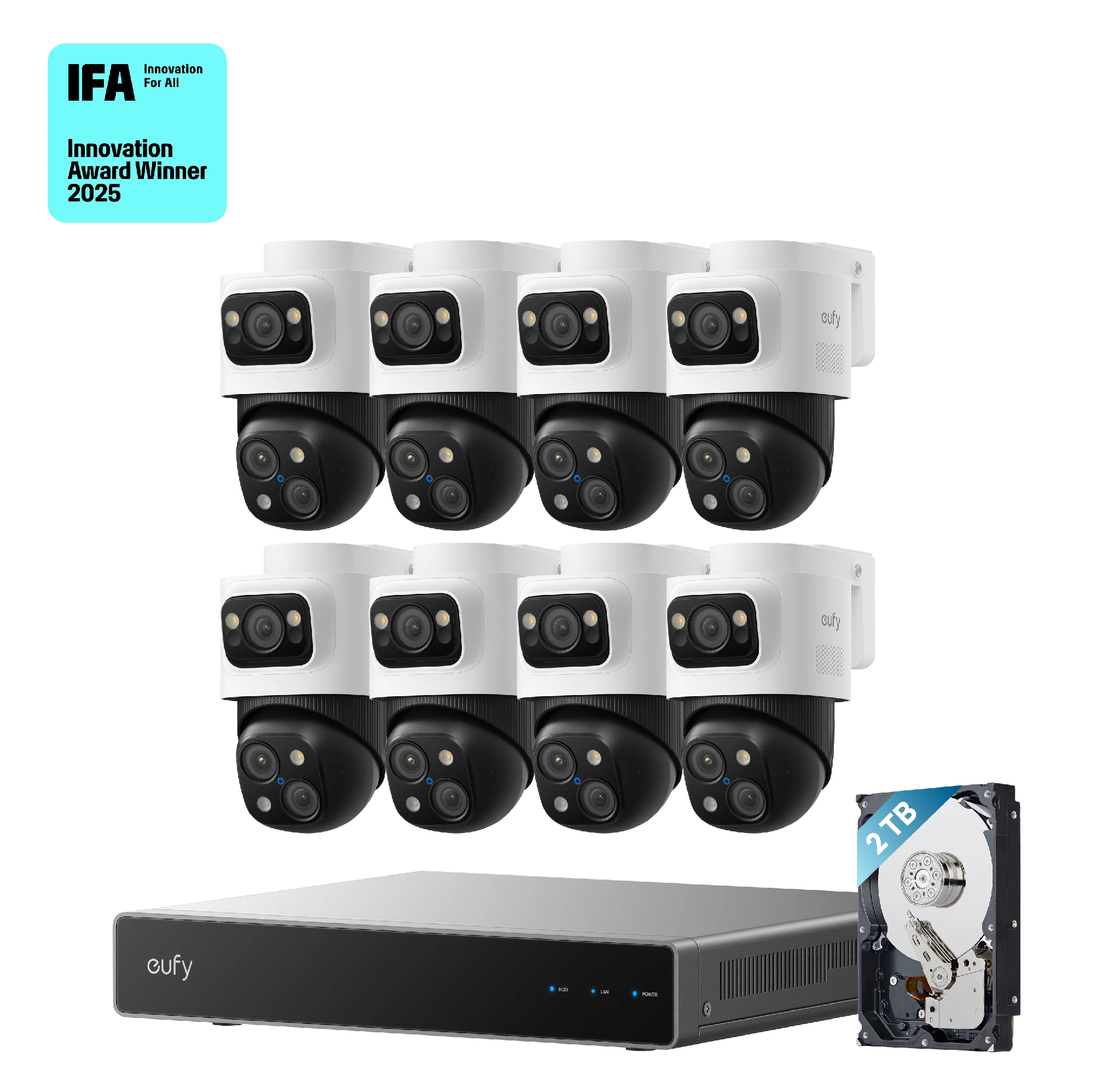
The eufy PoE NVR Security System S4 Max + 4 PoE Cam S4 Add-Ons shows what that looks like in practice. Its 8-Port NVR and 8 PoE Cam S4 units share one timeline in the eufy app, with local GUI and web access when you want a desk setup. Each camera combines an upper 4K wide-angle lens with a 122° fixed scene view and a lower 2K PTZ lens that pans 360° and zooms 8×, so a driveway or side-gate mount can hold both a wide scene and a closer track path. Live cross-cam tracking passes a subject to the next camera when someone crosses zones, closing the kind of clip gap that separate apps leave open. A pre-installed 2TB drive supports 24/7 local recording, and keyword search runs without a subscription fee, so you can rebuild a full driveway timeline the next morning or find one incident across eight feeds without opening every camera from the night before.
How to Check Whether Existing Cameras Can Join One System
Before you add a hub, NVR, or matching cameras, check three things about what you already own. In the app, every camera should share one account, family access, and one event timeline. Two brands usually mean two logins unless the manufacturer documents cross-brand support.
On hardware, match model, firmware, and channel count to the recorder or hub compatibility list. PoE alone does not guarantee admission; mixed brands need ONVIF or RTSP on both ends. Also match video format, since H.264 and H.265 support and 4K limits can block a feed without the right firmware. Cross-camera tracking and unified search need matched gear, not just shared Wi-Fi.
Conclusion
Managing several feeds is mostly discipline, not gear. Map movement zones first, then set names, groups, and alerts that match risk. Plan upload and storage before camera count drives up cost. Stay in one ecosystem when you can, use a kit at four to eight views, and add cameras only where coverage still breaks. A week of real use, or one renamed camera and tighter zone, often beats another mount.

Lynn Martelli is an editor at Readability. She received her MFA in Creative Writing from Antioch University and has worked as an editor for over 10 years. Lynn has edited a wide variety of books, including fiction, non-fiction, memoirs, and more. In her free time, Lynn enjoys reading, writing, and spending time with her family and friends.