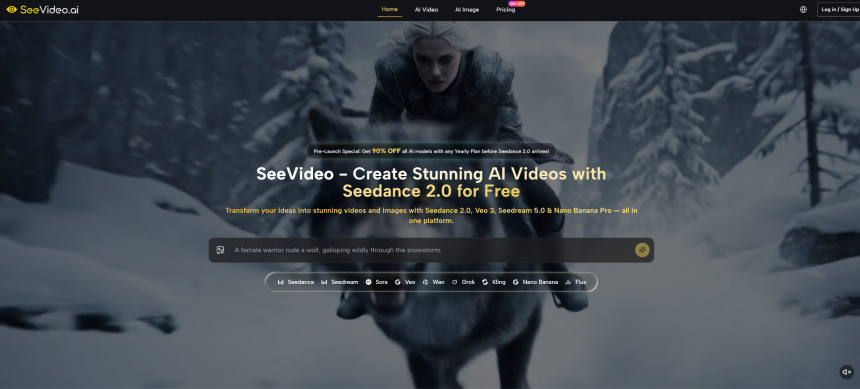
For many creators, the biggest hurdle in AI video generation isn’t the technology itself—it’s the narrative gap. Single-shot clips can look impressive, but stitching them into a coherent sequence that tells a story often feels like piecing together a puzzle without the picture on the box. Seedance 2.0 arrives as ByteDance’s answer to that gap, and the SeeVideo platform places it at the center of a multi-model creative workshop. Here, the focus shifts from isolated moments to longer-form storytelling that can hold a viewer’s attention across multiple scenes.
That promise doesn’t mean the tool works like effortless magic. In my own tests, the difference between a compelling tale and a disjointed reel often came down to how well I described the action, how many iterations I allowed myself, and which input method I used to kick things off. What felt genuinely new, however, was the feeling that the AI understood that a story arc needs continuity—not just beautiful imagery. For anyone who has wrestled with the traditional “generate, export, and manually cut” workflow, that shift is worth examining closely.
Moving Beyond One-Shot Generation Woes
Conventional AI video models are built around a single command yielding a single clip. The result can be mesmerizing on its own but rarely connects naturally to the next prompt you write. In practice, this forces editors into heavy post-production work just to create the illusion of intention. Seedance 2.0 tries to change that equation by treating narrative as a first-class citizen: it accepts a sequence of descriptions or a longer script-like prompt, and it strives to maintain character consistency, lighting continuity, and logical scene flow.
In my trials, the motion felt more deliberate than I expected. Objects didn’t flicker wildly between frames, and backgrounds remained recognizably the same when the camera panned to a new angle. This isn’t perfect—complex gestures like a character wielding a sword in a whirlwind sometimes warped, requiring prompt tweaks—but the baseline coherence definitely eases the editing burden.
How Different Models Handle Narrative and Motion
SeeVideo doesn’t bet on a single engine. It aggregates several leading models under one roof, so you can compare outputs without switching tabs. The table below outlines the three core video models I experimented with and how they performed on the same prompt that demanded a short narrative sequence.
| Model | Core Specialization | Input Options | Built-in Audio Generation | Narrative Coherence Observed |
| Seedance 2.0 | Multi-scene storytelling with logical transitions | Text, image, audio | No (syncs external audio) | High: scene changes felt planned and visually continuous |
| Veo 3 | Short clips with synchronous sound | Text, image | Yes, automatic dialogue and ambience | Moderate: strong single scenes, weaker multi-scene connection |
| Kling 3.0 | Extended cinematic motion and duration | Text, image | No | Moderate: smooth movement, tendency toward meandering drift |
What stood out in my comparisons was that Seedance 2.0 didn’t merely produce longer clips—it produced clips that seemed to remember what happened a few seconds earlier. Veo 3, on the other hand, excelled when I needed a quick social-media snippet with built-in music and voice, while Kling 3.0 handled sweeping drone-like shots with remarkable fluidity. Having all three accessible from the same dashboard let me weigh these strengths session by session, and I often ended up using Seedance 2.0 for the backbone narrative and another model for insert shots.
A Step-by-Step Walkthrough of the Creative Flow
The SeeVideo AI interface guides you through a linear workflow that nonetheless feels open to experimentation. Here is the three-stage process I followed, based entirely on what the platform presents.
Step 1: Provide Your Creative Direction
Your starting point sets the tone for everything that follows, and the platform invites you to begin in the way that matches your asset—words, a photo, or an audio file.
Crafting an Effective Text Prompt
I found that Seedance 2.0 responds best when you write more than a single line. Describing not only what happens but also the atmosphere, camera movement, and emotional cue gave me noticeably better transitions. A vague prompt like “a warrior rides a wolf in a storm” led to generic results; adding “the camera follows her determined face as lightning strikes, then cuts to the wolf’s paws sinking into snow” made the output feel directed.
Breathing Life into Static Images
Uploading a concept sketch or a product shot and choosing the image-to-video route turned a still frame into a moving preview within seconds. The platform handles most common formats, and from my observation, images with clear subjects and simple backgrounds reduce the chance of weird morphing artifacts.
Driving Video with Audio
Supplying a narration clip or a piece of instrumental music pushed the model to sync visual content to beats and speech cadence. Lip-sync isn’t flawless—I saw occasional mismatches, especially with fast speech—but the overall alignment between sound and visual rhythm added a layer of polish that would otherwise require manual editing.
Step 2: Select the Right Engine for Your Project
After uploading or writing your input, the platform asks you to choose an AI model, and this choice acts as a creative filter that shapes motion, color grading, and narrative flow.
Why Seedance 2.0 Shines for Narrative Projects
When I aimed to tell a mini story—a product demo that moved from wide establishing shot to close-up detail—Seedance 2.0 kept the product color consistent and the lighting logic believable. It genuinely felt like the tool understood that a video is a sequence, not just one spectacular frame. In several tests, background elements, such as trees or city buildings, remained stable across pans, which has been a recurring pain point in other generators I’ve tried.
When Veo 3 or Kling 3.0 Make More Sense
Switching to Veo 3 helped when I needed a talking-head snippet with natural-sounding ambient audio baked in, saving me a trip to a separate sound library. Kling 3.0 came in handy for drone-like flyovers where the emphasis was on fluid motion rather than scripted storytelling. Using the platform’s model-switching feature, I could generate parallel versions and pick the best take without starting from scratch.
Step 3: Generate, Assess, and Refine
Hitting generate is rarely the finish line. In my experience, the first output often reveals which parts of your prompt the model interpreted too literally and which nuance it missed.
Using the First Render as a Diagnostic
I learned to treat the initial video as a storyboard sketch. If a character’s movement broke awkwardly at a transition point, I tightened the prose around that beat. If the lighting shifted during a cut, I added a descriptor like “maintaining the same golden sunset illumination.”
Embracing a Lightweight Iteration Loop
After adjusting the prompt or swapping input assets, re-generation typically took less than a minute. A few cycles usually landed me at a clip I could use as a draft. Some projects required five or six tweaks before the facial expressions and motion felt right, but the platform made it easy to compare versions side by side. I also occasionally layered outputs from different models—a Kling 3.0 landscape shot combined with Seedance 2.0 character animation—to capitalize on each model’s strengths.
Real-World Observations and Areas for Growth
No current generative model handles everything flawlessly, and Seedance 2.0 is no exception. In my tests, intricate physical interactions—like a character pouring liquid or juggling objects—sometimes introduced glitches where hands and objects fused momentarily. Physical simulation is clearly advancing, as noted in a recent overview of AI video innovation by MIT Technology Review (October 2025), yet maintaining consistent physics over multiple scenes remains a frontier challenge.
Audio-driven sequences, while compelling in concept, still show mouth-motion drift when speakers talk rapidly or at unusual pitches. If perfect lip-sync is critical, you will likely need a dedicated dubbing step afterward. Additionally, prompt sensitivity can be high: a small wording change may shift the entire mood more than anticipated. This means the tool rewards careful writers, but it can frustrate those hoping for a one-shot miracle.
On the brighter side, scene lighting and shadow continuity felt more stable here than in earlier multi-scene experiments I’ve seen. The platform’s built-in image generators provided handy reference frames that helped me visualize before committing video credits, reducing wasteful renders.
Where Seedance 2.0 Fits in Your Creative Toolkit
Seedance 2.0, accessed through the SeeVideo workspace, is best understood as a narrative prototyping engine and a practical production accelerator—not as a replacement for human direction. It lowers the barrier between a script and a watchable draft, which proves especially useful for creators validations, concept pitches, or social storytelling that relies on sequence rather than standalone spectacle.
No single tool will fit every brief, and the sensible approach is to test where Seedance 2.0 saves you time versus where dedicated manual editing or another model delivers more precision. A free introductory tier lets you explore its narrative sensibilities firsthand, without commitment. The most honest recommendation I can give after dozens of sessions is this: approach it as a dialogue between your creative vision and the model’s interpretation. The output often surprises, sometimes stumbles, but consistently moves closer to the multi-scene language that creators have been asking for.

Lynn Martelli is an editor at Readability. She received her MFA in Creative Writing from Antioch University and has worked as an editor for over 10 years. Lynn has edited a wide variety of books, including fiction, non-fiction, memoirs, and more. In her free time, Lynn enjoys reading, writing, and spending time with her family and friends.