The request sounded straightforward: “We need users to be able to format their content: headings, bold text, maybe images.” Six months later, we had burned through two engineer sprints, shipped three incomplete versions, and accumulated a backlog of browser-specific bugs that seemed to multiply every time we closed one.
That’s the story behind almost every team that has decided to build its own rich text editor. The initial scope looks small. The first prototype takes a day or two. Then the edge cases start arriving: paste behaviour from Word documents, inconsistent rendering between Chrome and Firefox, mobile keyboard conflicts, XSS vulnerabilities lurking in pasted HTML, undo/redo state management that breaks in ways nobody anticipated. The scope that looked like a week of work quietly becomes a quarter.
The demand for rich text editing in modern web applications is real and growing. Users expect a polished, capable editing experience as table stakes, not a bonus feature. But what makes an HTML rich text editor difficult to build well isn’t the formatting toolbar. It’s everything that has to work invisibly underneath it.
This piece documents what teams typically discover the hard way during that process, the complexity that hides below the surface, the lessons that come too late, the mistakes that compound, and ultimately, why most teams that have gone through the build-it-yourself cycle reach the same conclusion.
Key Takeaways
- Rich text editors appear simple from the outside but involve complex challenges around HTML sanitisation, browser compatibility, and state management.
- Clean HTML output is not automatic; it requires deliberate architecture decisions from the start.
- Security is a non-negotiable dimension, not a post-launch concern. XSS risks enter through paste, upload, and embed points.
- UX requires ongoing refinement based on real user behaviour, first versions rarely get it right.
- Most teams that build their own editor eventually conclude that a well-chosen, ready-made solution delivers better outcomes at a fraction of the cost.
Why Building a Rich Text Editor Is More Complex Than Expected
What seems like a simple text editor can quickly become much more complicated in practice. Building a production-ready editor takes far more time and effort than most teams expect.
The Challenge of Handling HTML Formatting
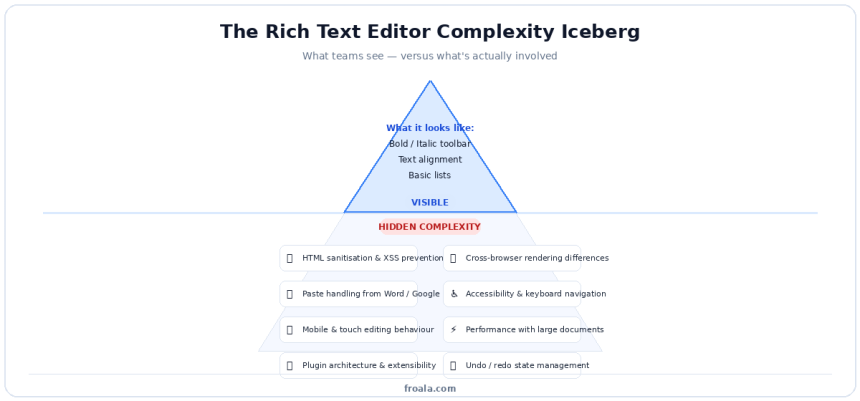
The visible part of a rich text editor: the toolbar with bold, italic, and heading controls, accounts for a small fraction of the actual implementation work. The harder problem is what happens to the HTML that those controls produce.
Managing clean and consistent markup is a persistent challenge. Different actions produce structurally different outputs. A user who bolds text by selecting it and clicking the toolbar button may produce <strong> tags. A user who pastes bold text from another source may produce <b> tags, <span style="font-weight:bold"> wrappers, or a mixture of both, all of which are semantically different and style differently depending on the CSS applied downstream.
Preventing broken layouts and formatting issues requires handling not just what users type, but what they paste, drag, or import from other contexts. Paste content from Microsoft Word, Google Docs, or a web page, and you’ll often get invisible <o:p> tags from Office XML, deeply nested <span> elements, inline style attributes that override every CSS rule you’ve written, and whitespace characters that don’t behave like regular spaces.
Supporting different content structures, mixed content with headings, inline code, block quotes, tables, and media means managing complex DOM nesting rules that browsers interpret inconsistently. A valid HTML structure in one browser may produce an unexpected layout in another. Keeping the editor’s internal state synchronised with the displayed output, especially after user interactions, is one of the hardest engineering problems in the domain.
Browser Compatibility Issues
If there’s one topic that appears in every post-mortem from teams that have built rich text editors, it’s browser compatibility. The web’s editing APIs: contenteditable, execCommand, Selection, Range, were never designed to be the foundation of a rich editing experience. They were retrofitted for it, and the inconsistencies that resulted have never been fully resolved.
Inconsistent rendering across browsers shows up in ways that range from cosmetic to functional. The same HTML may be line-wrapped differently in Safari versus Chrome. A cursor position that’s predictable in Firefox may land in an unexpected location in Edge after a complex selection operation. These differences aren’t bugs in your code; they’re properties of the underlying browser implementations.
Handling editor behaviour differences is especially painful around keyboard shortcuts, touch events, and IME input (the text composition systems used for languages like Chinese, Japanese, and Korean). Each browser implements these differently. Each mobile operating system adds another layer of variation. Building consistent behaviour across all of them requires browser-specific workarounds that accumulate over time.
Maintaining a consistent user experience across this fragmented landscape is the practical cost. Every browser update has the potential to change behaviour in ways your editor didn’t account for. Regressions appear silently, often reported by users before they’re caught internally.
Performance and Scalability Concerns
Performance problems in rich text editors often don’t appear in development. They appear in production, with real content, at real scale.
Slow rendering with large documents is a classic late-discovery issue. An editor that performs smoothly with a 500-word blog post may become sluggish or unresponsive with a 10,000-word document, a table with 200 rows, or a page with 50 embedded images. The DOM operations required to maintain a rich editing experience do not scale linearly with content size.
Balancing features with editor speed becomes a genuine tension as feature requests arrive. Each new capability, such as collaborative cursors, real-time preview, track changes, and custom formatting options, adds to the computational and memory load. An editor who started lean can accumulate enough feature weight to meaningfully degrade user experience.
Supporting scalable content workflows extends the performance concern beyond the editing interface itself. How does the editor behave when content is autosaved frequently? How does it handle large media assets? How does its output integrate with the downstream systems: content APIs, search indexes, email pipelines, that process what it produces? These questions surface later than the pure UI performance concerns, and they’re often harder to fix retroactively.
The toolbar is the visible tip. Below the surface lies the real implementation challenge, from sanitisation and browser quirks to accessibility, paste handling, and state management.
The teams that navigate these challenges most successfully share a set of hard-earned insights. Here’s what the experience consistently teaches.
Key Lessons Learned During Development
Most engineering teams discover these lessons through lived experience rather than foresight. The goal here is to compress that timeline.
Simplicity Matters More Than Features
The instinct when building a content editor is to include everything that might be useful. Header levels, font sizes, color pickers, special character insertion, custom spacing controls, all of these seem reasonable to add. The problem is that the features compound.
Avoiding cluttered interfaces is harder than it sounds when you’re in build mode. Every team member has a formatting option they think is essential. Every stakeholder demo surfaces a request for something else. The toolbar grows, and the editor’s usability shrinks with it.
The lesson that consistently emerges is that users want fewer, better controls, not more options. A toolbar that surfaces exactly what users need for their actual tasks, with everything else either hidden or removed, produces better outcomes than one that tries to cover every possible formatting scenario.
Prioritising usability for end users over completeness for edge cases is the discipline required. This means watching real users interact with the editor, identifying which controls they actually reach for, and being willing to remove things that seemed important during development but don’t show up in practice.
Focusing on essential editing tools, the ones that cover the vast majority of use cases, produces a leaner, faster, more learnable editor. The 80/20 principle applies: the most commonly used formatting operations account for the overwhelming majority of all user interactions.
Clean HTML Output Is Critical
The quality of the HTML an editor produces determines how the content behaves everywhere downstream: in browsers, in email clients, in CMS templates, in search indexes. This makes output quality an architectural concern, not a polish item.
Reducing unnecessary markup requires active work, not passive hope. An editor that allows paste from Word without sanitisation will accumulate layers of Office XML artifacts. An editor that allows inline styles will produce content that resists external CSS. An editor that nests <div> tags unnecessarily will create layout problems that appear only in specific rendering contexts.
Improving the maintainability of published content over time depends on the consistency of its structure. When all headings use <h2> through <h4>, all lists use <ul> and <ol>, and all emphasis uses <strong> and <em>, updating styles across a content library is a single CSS change. When markup is inconsistent, every update becomes an audit.
Supporting SEO and responsive layouts follows from semantic HTML. Search engines use heading structure to understand content hierarchy. Screen readers use it to navigate. Responsive CSS frameworks assume it. Messy, non-semantic markup undermines all three, quietly, without obvious errors, but with real effects on reach and accessibility.
User Experience Requires Constant Refinement
The assumption that UX is a launch-time concern rather than an ongoing one is one of the most common and expensive mistakes in editor development.
Improving toolbar accessibility often doesn’t happen until users with assistive technology report problems, which is later than it should. Keyboard navigation through the toolbar, focus management during formatting operations, and ARIA labeling for icon buttons are all details that are easy to defer and difficult to retrofit.
Simplifying formatting workflows requires watching users, not imagining them. Workflows that seem logical during design often reveal friction points in practice: a multi-step process to insert a link, a modal that interrupts the writing flow, an undo behaviour that doesn’t match user expectations. These problems don’t appear in demos. They appear in usage data and support tickets.
Reducing learning curves for users is a function of interface predictability. Users bring expectations from other editing tools they’ve used. An editor who aligns with those expectations requires less onboarding. One that deviates from convention without good reason creates confusion that erodes adoption.
Beyond the architectural and UX lessons, certain features consistently prove their value once teams have built and observed real-world usage.
Features That Became Essential
Some capabilities start as nice-to-haves and become non-negotiable once users experience them. These are the features that teams consistently underestimate during initial scoping.
Real-Time Preview and Editing
The shift from a code-based editing experience to a true WYSIWYG interface is so significant that teams who implement it rarely consider reverting, even when the implementation complexity is substantial.
Instant formatting visibility changes how users interact with content. When the result of a formatting decision is visible immediately, users make better decisions, catch layout problems earlier, and require less back-and-forth with reviewers. The editing session and the review session collapse into one.
Faster editing workflows follow directly. Without real-time preview, every formatting check requires switching context: opening a preview tab, refreshing, evaluating, returning to the editor. With it, the feedback loop closes in real time.
Reduced publishing errors are the downstream benefit. Content that’s been reviewed in its actual formatted state before publishing has fewer surprises at go-live. Formatting mistakes that would have become post-publish corrections are caught during editing instead.
Media and Content Embedding
Text-only editors serve a shrinking portion of real content needs. Modern content almost always includes images, occasionally includes video, and increasingly includes embedded interactive elements.
Image and video support needs to feel native to the editing experience, not like a separate workflow bolted onto a text editor. Users who need to insert a screenshot should be able to drag it in from their desktop or paste it from their clipboard without leaving the editor context.
Drag-and-drop functionality is the specific interaction pattern that users consistently prefer. The ability to drag a file, an image, or a content block and drop it into the right position within the document maps directly to how people think about arranging content and removes the need to understand any underlying technical mechanism.
Flexible content formatting around embedded media: wrapping text, alignment options, resize handles, determines whether the final output looks intentional or cobbled together. These details take longer to implement than the basic embedding capability, but they’re what users notice.
Customisation and Flexibility
An editor that can’t adapt to the specific context in which it’s embedded becomes a constraint on the product rather than a capability within it.
Toolbar customisation options allow the editor to be configured for specific use cases: a documentation editor that shows different controls than a blog editor, or a mobile interface that surfaces only the most commonly used formatting options. Without this flexibility, the editor imposes its own opinions on every context it serves.
Plugin and integration support determine the editor’s long-term extensibility. A plugin architecture that allows new capabilities to be added without modifying the core editor keeps the base lean while enabling growth. Integrations with external services: image libraries, content APIs, AI writing tools, extend the editor’s value without complicating its core.
Adaptability for different use cases is what makes the difference between an editor that serves one product context and one that can serve many. The editor embedded in a customer support knowledge base has different requirements than the one embedded in a marketing email builder. Both can share the same core if the customisation layer is thoughtfully designed.
Knowing what to build is part of the challenge. Avoiding what not to build and what not to overlook is equally important.
Common Mistakes Teams Make
These aren’t hypothetical pitfalls. They’re the patterns that appear repeatedly in post-mortems from teams who’ve been through the build cycle.
Overengineering the Editor
The most common mistake is also the most understandable. When building a new tool, the temptation is to build it comprehensively, to anticipate every use case and ship a feature set that covers all of them.
Adding unnecessary features is how editors become slow, complex, and hard to maintain. Every feature added before it’s validated by actual user behaviour is a bet on what users will need. Those bets are frequently wrong, and the cost of being wrong is paid in bundle size, rendering speed, and maintenance overhead, not just once, but indefinitely.
Increasing complexity and maintenance are the compounding costs. Features that seemed simple to add often turn out to have subtle interactions with other parts of the editor. An image upload feature that works fine in isolation may conflict with drag-and-drop behaviour. A custom list formatting option may break undo history. These interactions only become visible after the feature is shipped.
Slowing overall performance is the user-facing consequence. An overbuilt editor loads more slowly, responds sluggishly to complex operations, and consumes more memory, all of which affect the user experience in ways that are difficult to reverse without a significant architecture refactor.
Ignoring Security Considerations
Security is the dimension most commonly deferred until “later”, and most frequently responsible for the hardest production incidents.
Risks of unsafe HTML input are everywhere in a rich text editor. Every paste operation is a potential injection vector. Every URL field accepts input that could contain JavaScript: protocol links. Every image upload endpoint can be targeted with crafted requests. None of these risks is theoretical; they’re the specific vulnerabilities that appear in security audits of editors built without explicit sanitisation.
The need for sanitisation and validation applies at every entry point: paste, typing, upload, drag-and-drop, and API input. Sanitisation that happens only on output, rather than at each input point, leaves a window for malicious content to persist in state, sync to collaborators, or reach autosave endpoints before it’s cleaned.
Preventing XSS vulnerabilities requires treating the editor as a hostile input surface by default, not a trusted one. Users don’t have malicious intent, but the content they paste from external sources often carries scripts, event handlers, or data URIs that behave maliciously in a browser context. Defence in depth: sanitise early, validate often, escape on render, is the only reliable posture.
Underestimating Long-Term Maintenance
The decision to build a rich text editor isn’t a one-time engineering investment. It’s a recurring commitment that extends for as long as the product is alive.
Ongoing browser updates regularly change the behaviour of the editing APIs that rich text editors depend on. A Chrome update may change how contenteditable handles cursor placement. A Safari update may change how touch events are processed. A Firefox update may change how paste events fire. Each of these changes has the potential to introduce regressions that users notice before the development team does.
Feature enhancement demands accumulate as the product grows. Users who adopt the editor develop expectations about what it should do. Those expectations expand over time toward collaboration features, AI integration, more customisation, and better mobile behaviour. Each of these enhancements requires engineering time that competes with other product priorities.
Scalability challenges over time emerge as content volume grows and use cases diversify. An editor designed for 500-word articles may struggle with long-form documentation. One designed for single authors may not handle concurrent editing gracefully. Retrofitting scalability into an architecture that wasn’t designed for it is consistently more expensive than building for it from the start.
This accumulated experience: the complexity, the lessons, the mistakes, is what shapes the conclusion that most experienced teams reach.
Why Modern Teams Choose Ready-Made Editors
The build-vs-buy question for rich text editors has a fairly consistent answer among teams that have experience on both sides of it.
Faster Development Cycles
The most immediate argument for a ready-made editor is the engineering time it recovers.
Reducing engineering workload is the direct benefit. Building a production-grade rich text editor from scratch is a multi-quarter undertaking. Adopting a well-chosen library reduces that to days or weeks of integration work, with a far higher starting quality floor.
Accelerating product launches is the strategic consequence. Engineering capacity redirected from editor infrastructure toward product-specific features produces better outcomes for users and better competitive positioning. The editing capability is still there; the time cost of providing it is dramatically lower.
Avoiding rebuilding common features is the specific cost that tends to drive the conclusion home. Teams that build their own editors almost inevitably find themselves reimplementing the same features: paste sanitisation, undo/redo, browser compatibility shims, mobile input handling, that ready-made editors have already solved, tested, and maintained. The value of not doing that work is real and significant.
Better User Experience
Ready-made editors don’t just save development time; they tend to produce better user experiences than first-version custom builds, because they’re built on accumulated feedback from many more users.
Mature and tested editing workflows reflect years of observation of how users actually interact with formatting tools. The interaction patterns in a well-maintained commercial editor have been refined through iteration. First-version custom editors are, by definition, unrefined.
Consistent cross-browser functionality is one of the areas where the investment behind a mature editor is most visible. Browser compatibility is not a solved problem; it’s an ongoing maintenance task. Ready-made editors that are actively maintained absorb that task so product teams don’t have to.
Reliable formatting capabilities: the ability to trust that bold behaves consistently, that paste sanitisation works, that undo history is predictable, is the foundation on which everything else depends. Users notice when it’s absent. They take it for granted when it works. Getting to “works” faster and keeping it working with less ongoing effort is the core value proposition.
Here’s a side-by-side comparison of building from scratch and using a ready-made editor across six dimensions:
| Dimension | Building From Scratch | Ready-Made Editor |
| Time to first working editor | 3–6 months minimum | Days to weeks |
| Browser compatibility | Manual, ongoing, unpredictable | Handled by vendor |
| Security (XSS, sanitisation) | Must build and audit yourself | Built-in, regularly patched |
| Long-term maintenance cost | High, full team responsibility | Low, vendor-managed |
| Feature depth (day one) | Limited to what you ship | Mature, tested, documented |
| Customization flexibility | Total, but costly to add | Plugin-based, API-driven |
Conclusion
The journey of building a rich text editor teaches the same lessons to nearly every team that takes it: the complexity is real, the timeline is longer than expected, the security surface is larger than it appears, and the maintenance commitment is indefinite.
None of this means custom editors are never the right choice. There are product contexts where the control and differentiation of a ground-up implementation justify the investment. But those contexts are rarer than most teams assume when they start.
For the majority of web applications that need a capable editing experience, the better path is a well-chosen, actively maintained HTML rich text editor, one that handles the browser compatibility, the sanitisation, the UX refinement, and the maintenance overhead so the product team can focus on what makes their product distinctive.
The teams that get this right aren’t the ones that build the most sophisticated editor from scratch. They’re the ones that made a clear-eyed decision about where their engineering investment would create the most value, and deployed that investment accordingly.
The lessons are available either way. The question is whether you learn them before or after the sprint burns.
If your team is weighing whether to build or adopt an HTML rich text editor, Froala Online HTML Editor gives you a practical way to test clean HTML output, visual editing, media support, and cross-browser editing behaviour before committing engineering time to building everything from scratch.
Frequently Asked Questions
What is an HTML rich text editor?
An HTML rich text editor lets users create and format content through a visual interface without writing HTML code manually. As users add headings, lists, links, images, and other formatting, the editor automatically generates clean HTML in the background.
Why is building a rich text editor difficult?
Building a rich text editor is challenging because browsers handle editing features differently, which can lead to inconsistent behaviour. Developers also need to manage complex tasks like paste handling, clean HTML generation, security, and performance for large documents.
What features are important in an HTML-rich text editor?
A good HTML rich text editor should generate clean HTML, provide an intuitive editing experience, and include strong security protections. It should also be scalable, with support for customisation, plugins, and smooth performance as content and user needs grow.

Lynn Martelli is an editor at Readability. She received her MFA in Creative Writing from Antioch University and has worked as an editor for over 10 years. Lynn has edited a wide variety of books, including fiction, non-fiction, memoirs, and more. In her free time, Lynn enjoys reading, writing, and spending time with her family and friends.